顯示具有 ds18b20 標籤的文章。 顯示所有文章

2023年7月27日 星期四

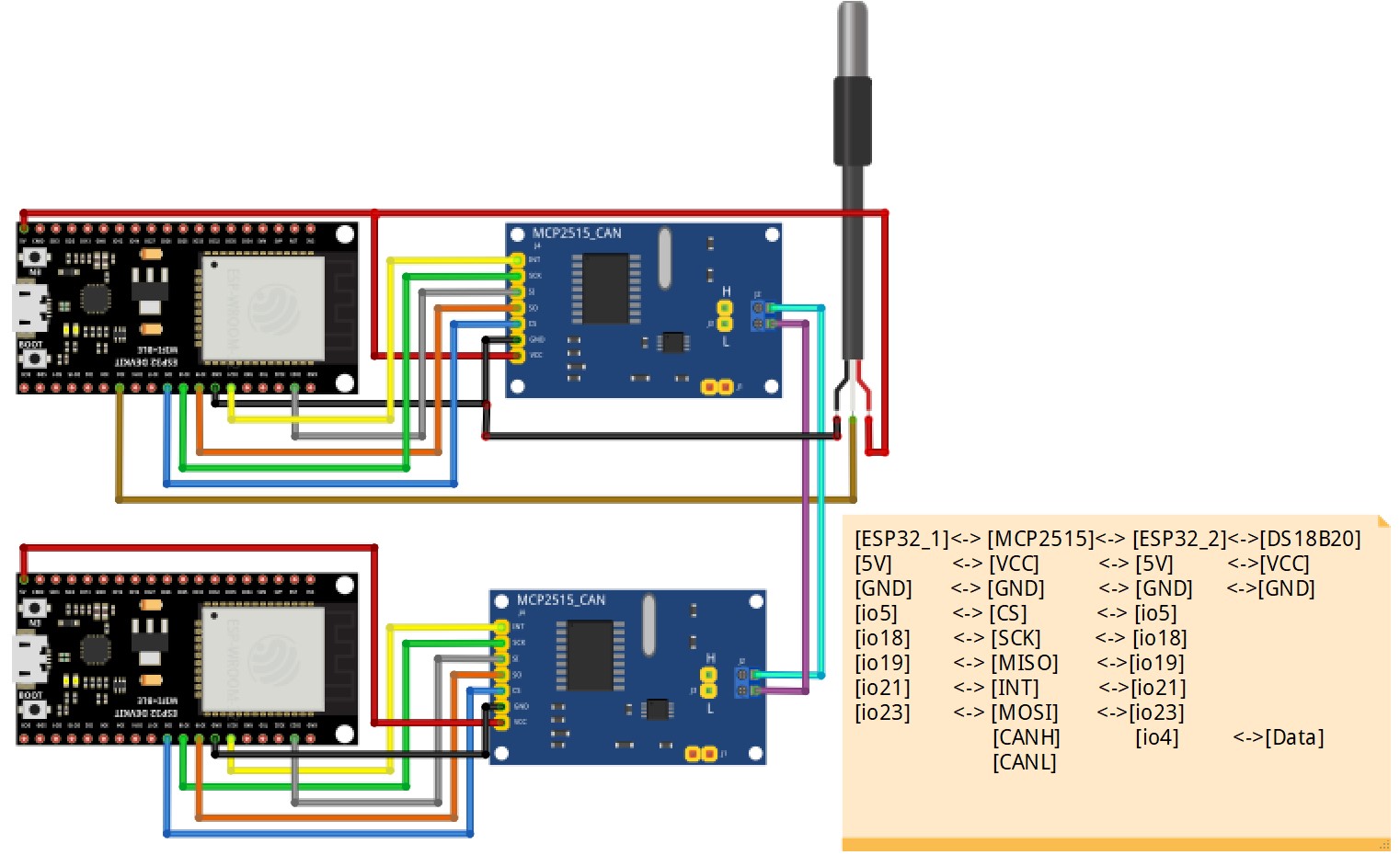
Two ESP32 CAN Bus communication with MCP2515 module

Purpose:

Use the function of two articles (ESP32 one Wire Bus Application – DS18B20 section) and (ESP32 + MCP2515 use CanHacker on CAN Bus system) in my channel to integrate into a new topic.One ESP32 transfer the temperature on DS18B20 to the other ESP32 via can bus system.
CAN Bus communication with MCP2515 module to communicate between two ESP32

#1_ESP32+MCP2515+DS18B20 <--->#2_ESP32+MCP2515(ESP32 + MCP2515 use CanHacker on CAN Bus system)

#1_ESP32 PID is can.txId = 0x7D1;

Circuit:


Code Introduce:

//-----------------Mega2560 MCP2515 code --------------------------------------
mcp_can library mcp_can - Arduino Reference

#include <OneWire.h>
#include <DallasTemperature.h>
#include <BluetoothSerial.h>
#include <SPI.h>
#include "mcp_can.h"
//------CAN BUS setting ---------------------------------------------------------
#define CAN0_INT 21 // Set INT to pin 50
const int SPI_CS_PIN = 5;
MCP_CAN CAN0(SPI_CS_PIN);
//-----   DS18B20  ------------------
#define DQ_Pin 4

OneWire oneWire(DQ_Pin);
DallasTemperature sensors(&oneWire);

byte data[12]; // buffer for data
byte address[8]; // 64 bit device address

#define LED_BUILTIN 2
BluetoothSerial SerialBT;
//--------- Flag structure --------------------------------------
typedef struct _vFlag
{
  uint8_t BTFlag = 0;
  uint8_t DC_Flag = 0;
  uint8_t CANFlag = 0;
  uint8_t I2C_Flag = 0;
  uint8_t BMP180Flag = 0;
  uint8_t DS18B20Flag = 0;
  uint8_t JSONFlag = 0;
  uint8_t LEDFlag = 1;
  uint8_t sensor_Flag = 0;
  uint8_t sensor1_Flag = 0;
  uint8_t initial_Flag = 0;
  uint8_t Tone_Flag = -1;
  uint8_t IR_RECV_Flag=0;
  uint8_t IR_SEND_Flag=0;
  uint8_t FunctionFlag = 3;
  uint8_t SendFlag = 0;
  uint8_t BMPCnt = 0;
} vFlag;
vFlag *flag_Ptr;
vFlag flag;
//----------uart--------------
#define LINE_BUFFER_LENGTH 64
//--------- uart structure --------------------------------------
typedef struct _vUart
{
  char c;
  int lineIndex = 0;
  int line1Index = 0;
  int BTlineIndex = 0;
  bool lineIsComment;
  bool lineSemiColon;
  //char *line;
  char line[128];
  //char line1[128];
  char BTline[20];
  //char R_line[20];
  //char L_line[20];
  String inputString;
  String BTinputString;
  String S1inputString;
  int V[16];
  char ctemp[30];
  char I2C_Data[80];
  int DC_Spped = 50;
  float Voltage[16];
  int Buffer[128];
  int StartCnt = 0;
  int ReadCnt = 0;
  int sensorValue = 0;
} vUart;
vUart *Uart_Ptr;
vUart Uart;
//-------------CAN-------------------------------
typedef struct _vCAN_t
{
  long unsigned int rxId;
  long unsigned int txId;
  unsigned char rxlen = 8;
  unsigned char txlen = 8;
  unsigned char rxext = 0;
  unsigned char txext = 0;
  unsigned char rxBuf[20];
  byte data[8];
  unsigned char masknum = 0;
  unsigned char maskext = 0;
  long unsigned int maskId;
  unsigned char filternum = 0;
  unsigned char filterext = 0;
  long unsigned int filterId;
} vCAN_t;

vCAN_t *can_Ptr;
vCAN_t can;

//-------------------------------------------------
void setup()
{
  Serial.begin(9600);
  Serial.println(F("init"));
  pinMode(LED_BUILTIN, OUTPUT);
  SerialBT.begin("BT_BS18B20");// BTName

  if (oneWire.search(address))
  {
    Serial.println("Slave device found!");
    Serial.print("Device Address = ");
    Serial.println(address[0]);
  }
  else
  {
    Serial.println("Slave device not found!");
  }
  //-----DS-----------
  sensors.begin();
  //standard frame
  can.txId = 0x7D1;
  can.txext = 0;
  can.txlen = 8;
  can.data[0] = 0x8E;
  can.data[1] = 0x00;
  can.data[2] = 0x00;
  can.data[3] = 0x00;
  can.data[4] = 0x00;
  can.data[5] = 0x00;
  can.data[6] = 0x00;
  can.data[7] = 0x00;

}
//-----------------------------------------
void loop()
{
  Serial.print(F("Main at core:"));
  Serial.println(xPortGetCoreID());
  while(1)
  {
    if(flag.LEDFlag == 1)
    {
      digitalWrite(LED_BUILTIN, HIGH); // turn the LED on (HIGH is the voltage level)
      vTaskDelay(300);
      digitalWrite(LED_BUILTIN, LOW); // turn the LED off by making the voltage LOW
      vTaskDelay(300);
    }
    while (Serial.available() > 0)
    {
      Uart.c = Serial.read();

      if ((Uart.c == '\n') || (Uart.c == '\r'))
      { // End of line reached
        if (Uart.lineIndex > 0)
        { // Line is complete. Then execute!
          Uart.line[Uart.lineIndex] = '\0'; // Terminate string

          processCommand(Uart.line); // do something with the command
          SerialBT.println(Uart.line);

          Uart.lineIndex = 0;
          Uart.inputString = "";
        }
        else
        {
          // Empty or comment line. Skip block.
        }
        Uart.lineIsComment = false;
        Uart.lineSemiColon = false;
        Serial.println(F("ok>"));
      }
      else
      {
        //Serial.println( c );
        if ((Uart.lineIsComment) || (Uart.lineSemiColon))
        {
          if (Uart.c == ')')
            Uart.lineIsComment = false; // End of comment. Resume line.
        }
        else
        {
          if (Uart.c == '/')
          { // Block delete not supported. Ignore character.
          }
          else if (Uart.c == '~')
          { // Enable comments flag and ignore all characters until ')' or EOL.
            Uart.lineIsComment = true;
          }
          else if (Uart.c == ';')
          {
            Uart.lineSemiColon = true;
          }
          else if (Uart.lineIndex >= LINE_BUFFER_LENGTH - 1)
          {
            Serial.println("ERROR - lineBuffer overflow");
            Uart.lineIsComment = false;
            Uart.lineSemiColon = false;
          }
          else if (Uart.c >= 'a' && Uart.c <= 'z')
          { // Upcase lowercase
            Uart.line[Uart.lineIndex] = Uart.c - 'a' + 'A';
            Uart.lineIndex = Uart.lineIndex + 1;
            Uart.inputString += (char)(Uart.c - 'a' + 'A');
          }
          else
          {
            Uart.line[Uart.lineIndex] = Uart.c;
            Uart.lineIndex = Uart.lineIndex + 1;
            Uart.inputString += Uart.c;
          }
        }
      }
    } //while (Serial.available() > 0)
    while (SerialBT.available())
    {
      String BTdata = SerialBT.readString();

      Serial.println(BTdata);
      BTprocessCommand(BTdata);
    }//while (BT.available())
 
    if(flag.DS18B20Flag == 1)
    {
      vDS18B20Task();
      sensors.requestTemperatures();
      SerialBT.print("E");
      SerialBT.println(sensors.getTempCByIndex(0));
    }

    if (flag.CANFlag == 1)
    {
      Serial.print("Temperatures --> ");
      sensors.requestTemperatures();
      Serial.println(sensors.getTempCByIndex(0));
      //--------------------------------
      float f=sensors.getTempCByIndex(0);
      String mystring;
      mystring = String(f);
      byte float_data[mystring.length()+1];
      mystring.getBytes(float_data, mystring.length()+1);
      //---------------------------------------------
      int size = sizeof(float_data);
      for(int i=0;i<size;i++)
      {
        can.data[i] =float_data[i];
      }
     
      flag.CANFlag = 2;
      flag.LEDFlag = 0;
      delay(50);
      byte sndStat = CAN0.sendMsgBuf(can.txId, can.txext, can.txlen, can.data);
      if (sndStat == CAN_OK)
        Serial.println("CAN Message Sent Successfully!");
      else
        Serial.println("Error Sending CAN Message...");
      flag.CANFlag = 1;
    }
    /**
    else
    {
      Serial.println("Open CAN First...");
    }**/

  }
}
//-------------------------------------
void BTprocessCommand(String data)
{
 
}
//----------------------------------------
void processCommand(char *data)
{
  int len, xlen, ylen, zlen, alen;
  int tempDIO;
  String stemp;

  len = Uart.inputString.length();
  //---------------------------------------
  if (strstr(data, "VER") != NULL)
  {
    Serial.println(F("ESP32_20230727"));
    Serial.println(F("CAN_DS18B20"));
  }
  if (strstr(data, "DS18B20_ON") != NULL)
  {
    flag.DS18B20Flag = 1;
    flag.LEDFlag=0;
    Serial.println(F("DS18B20_ON"));

  }
  if (strstr(data, "DS18B20_OFF") != NULL)
  {
    flag.DS18B20Flag = 0;
    flag.LEDFlag=1;
    Serial.println(F("DS18B20_OFF"));
  }
  ///----------CAN function ----------------
  if (strstr(data, "CAN_ON_125") != NULL)
  {
    if (flag.CANFlag == 0)
    {
      if (CAN_OK != CAN0.begin(MCP_NORMAL, CAN_125KBPS, MCP_8MHZ))
      {
        Serial.println("CAN BUS Shield init fail");
        Serial.println("Init CAN BUS Shield again");
        flag.CANFlag = 0;
      }
      else
      {
        Serial.println("CAN BUS Shield init ok!");
        CAN0.setMode(MCP_NORMAL); // Set operation mode to normal so the MCP2515 sends acks to received data.
        pinMode(CAN0_INT, INPUT); // Configuring pin for /INT input
        flag.CANFlag = 1;
        Serial.println("init ok");
      }
    }
    else if (flag.CANFlag == 2)
    {
      flag.CANFlag = 1;
      Serial.println("CAN BUS message ON!");
    }
  }
  if (strstr(data, "CAN_ON_250") != NULL)
  {
    if (flag.CANFlag == 0)
    {
      if (CAN_OK != CAN0.begin(MCP_NORMAL, CAN_250KBPS, MCP_8MHZ))
      {
        Serial.println("CAN BUS Shield init fail");
        Serial.println("Init CAN BUS Shield again");
        flag.CANFlag = 0;
      }
      else
      {
        Serial.println("CAN BUS Shield init ok!");
        CAN0.setMode(MCP_NORMAL); // Set operation mode to normal so the MCP2515 sends acks to received data.
        pinMode(CAN0_INT, INPUT); // Configuring pin for /INT input
        flag.CANFlag = 1;
        Serial.println("init ok");
      }
    }
    else if (flag.CANFlag == 2)
    {
      flag.CANFlag = 1;
      Serial.println("CAN BUS message ON!");
    }
  }
  if (strstr(data, "CAN_ON_500") != NULL)
  {
    if (flag.CANFlag == 0)
    {
      if (CAN_OK != CAN0.begin(MCP_NORMAL, CAN_500KBPS, MCP_8MHZ))
      {
        Serial.println("CAN BUS Shield init fail");
        Serial.println("Init CAN BUS Shield again");
        flag.CANFlag = 0;
      }
      else
      {
        Serial.println("CAN BUS Shield init ok!");
        CAN0.setMode(MCP_NORMAL); // Set operation mode to normal so the MCP2515 sends acks to received data.
        pinMode(CAN0_INT, INPUT); // Configuring pin for /INT input
        flag.CANFlag = 1;
        Serial.println("init ok");
      }
    }
    else if (flag.CANFlag == 2)
    {
      flag.CANFlag = 1;
      Serial.println("CAN BUS message ON!");
    }
  }
  if (strstr(data, "CAN_OFF") != NULL)
  {
    flag.CANFlag = 2;
    flag.LEDFlag = 1;
    Serial.println("CAN BUS message OFF!");
  }
}
//-----------------------------------------

//-------------------------------------------
void vDS18B20Task()
{
  Serial.print("Temperatures --> ");
  sensors.requestTemperatures();
  Serial.println(sensors.getTempCByIndex(0));
}

YouTube Demonstration:


2023年7月25日 星期二

DS18B20 temperature recorder - ESP32 Bluetooth SPP control

Purpose:

手機安裝Bluetooth Terminal/Graphics APP

Use the mobile phone APP to read the temperature display curve or value of the DS18B20 read by the ESP32 through the Bluetooth SPP profile on the mobile phone.

利用手機APP經由藍芽 SPP profile將ESP32讀取到的DS18B20的溫度顯示曲線或數值在手機

圖一: Bluetooth Terminal/Graphics APP
圖二: Bluetooth SPP Profile

Fundamental :

1-Wire communication is a protocol operating through one wire between the controller device and the peripheral device.

SPP (Serial Port Profile) is a Classic Bluetooth profile, SPP defines the requirements for Bluetooth devices necessary for setting up emulated serial cable connections using RFCOMM between two peer devices. The requirements are expressed in terms of services provided to applications, and by defining the features and procedures that are required for interoperability between Bluetooth devices.

圖三: 1-Wire structure

圖四: DS18B20 components

Circuit:

Code Introduce:

#include <OneWire.h>
#include <DallasTemperature.h>
#include <BluetoothSerial.h>
//--------- Flag structure --------------------------------------
typedef struct _vFlag
{
  uint8_t BTFlag = 0;
  uint8_t DC_Flag = 0;
  uint8_t CANFlag = 0;
  uint8_t I2C_Flag = 0;
  uint8_t BMP180Flag = 0;
  uint8_t DS18B20Flag = 0;
  uint8_t JSONFlag = 0;
  uint8_t LEDFlag = 1;
  uint8_t sensor_Flag = 0;
  uint8_t sensor1_Flag = 0;
  uint8_t initial_Flag = 0;
  uint8_t Tone_Flag = -1;
  uint8_t IR_RECV_Flag=0;
  uint8_t IR_SEND_Flag=0;
  uint8_t FunctionFlag = 3;
  uint8_t SendFlag = 0;
  uint8_t BMPCnt = 0;
} vFlag;
vFlag *flag_Ptr;
vFlag flag;

//-----   DS18B20  ------------------
#define DQ_Pin 4

OneWire oneWire(DQ_Pin);
DallasTemperature sensors(&oneWire);

byte data[12]; // buffer for data
byte address[8]; // 64 bit device address

#define LED_BUILTIN 2
BluetoothSerial SerialBT;
//----------uart--------------
#define LINE_BUFFER_LENGTH 64
//--------- uart structure --------------------------------------
typedef struct _vUart
{
  char c;
  int lineIndex = 0;
  int line1Index = 0;
  int BTlineIndex = 0;
  bool lineIsComment;
  bool lineSemiColon;
  //char *line;
  char line[128];
  //char line1[128];
  char BTline[20];
  //char R_line[20];
  //char L_line[20];
  String inputString;
  String BTinputString;
  String S1inputString;
  int V[16];
  char ctemp[30];
  char I2C_Data[80];
  int DC_Spped = 50;
  float Voltage[16];
  int Buffer[128];
  int StartCnt = 0;
  int ReadCnt = 0;
  int sensorValue = 0;
} vUart;
vUart *Uart_Ptr;
vUart Uart;

//-------------------------------------------------
void setup()
{
  Serial.begin(9600);
  Serial.println(F("init"));
  pinMode(LED_BUILTIN, OUTPUT);
  SerialBT.begin("BT_BS18B20");// BTName

  if (oneWire.search(address))
  {
    Serial.println("Slave device found!");
    Serial.print("Device Address = ");
    Serial.println(address[0]);
  }
  else
  {
    Serial.println("Slave device not found!");
  }
  //-----DS-----------
  sensors.begin();
}
//-----------------------------------------
void loop()
{
  Serial.print(F("Main at core:"));
  Serial.println(xPortGetCoreID());
  while(1)
  {
    if(flag.LEDFlag == 1)
    {
      digitalWrite(LED_BUILTIN, HIGH); // turn the LED on (HIGH is the voltage level)
      vTaskDelay(300);
      digitalWrite(LED_BUILTIN, LOW); // turn the LED off by making the voltage LOW
      vTaskDelay(300);
    }
    while (Serial.available() > 0)
    {
      Uart.c = Serial.read();

      if ((Uart.c == '\n') || (Uart.c == '\r'))
      { // End of line reached
        if (Uart.lineIndex > 0)
        { // Line is complete. Then execute!
          Uart.line[Uart.lineIndex] = '\0'; // Terminate string

          processCommand(Uart.line); // do something with the command
          SerialBT.println(Uart.line);

          Uart.lineIndex = 0;
          Uart.inputString = "";
        }
        else
        {
          // Empty or comment line. Skip block.
        }
        Uart.lineIsComment = false;
        Uart.lineSemiColon = false;
        Serial.println(F("ok>"));
      }
      else
      {
        //Serial.println( c );
        if ((Uart.lineIsComment) || (Uart.lineSemiColon))
        {
          if (Uart.c == ')')
            Uart.lineIsComment = false; // End of comment. Resume line.
        }
        else
        {
          if (Uart.c == '/')
          { // Block delete not supported. Ignore character.
          }
          else if (Uart.c == '~')
          { // Enable comments flag and ignore all characters until ')' or EOL.
            Uart.lineIsComment = true;
          }
          else if (Uart.c == ';')
          {
            Uart.lineSemiColon = true;
          }
          else if (Uart.lineIndex >= LINE_BUFFER_LENGTH - 1)
          {
            Serial.println("ERROR - lineBuffer overflow");
            Uart.lineIsComment = false;
            Uart.lineSemiColon = false;
          }
          else if (Uart.c >= 'a' && Uart.c <= 'z')
          { // Upcase lowercase
            Uart.line[Uart.lineIndex] = Uart.c - 'a' + 'A';
            Uart.lineIndex = Uart.lineIndex + 1;
            Uart.inputString += (char)(Uart.c - 'a' + 'A');
          }
          else
          {
            Uart.line[Uart.lineIndex] = Uart.c;
            Uart.lineIndex = Uart.lineIndex + 1;
            Uart.inputString += Uart.c;
          }
        }
      }
    } //while (Serial.available() > 0)
    while (SerialBT.available())
    {
      String BTdata = SerialBT.readString();

      Serial.println(BTdata);
      BTprocessCommand(BTdata);
    }//while (BT.available())
 
    if(flag.DS18B20Flag == 1)
    {
      vDS18B20Task();
      sensors.requestTemperatures();
      SerialBT.print("E");
      SerialBT.println(sensors.getTempCByIndex(0));
    }

  }
}
//-------------------------------------
void BTprocessCommand(String data)
{
 
}
//----------------------------------------
void processCommand(char *data)
{
  int len, xlen, ylen, zlen, alen;
  int tempDIO;
  String stemp;

  len = Uart.inputString.length();
  //---------------------------------------
  if (strstr(data, "VER") != NULL)
  {
    Serial.println(F("ESP32_20230710"));
  }
  if (strstr(data, "DS18B20_ON") != NULL)
  {
    flag.DS18B20Flag = 1;
    Serial.println(F("DS18B20_ON"));

  }
  if (strstr(data, "DS18B20_OFF") != NULL)
  {
    flag.DS18B20Flag = 0;
    Serial.println(F("DS18B20_OFF"));

  }
}
//-----------------------------------------

//-------------------------------------------
void vDS18B20Task()
{
  Serial.print("Temperatures --> ");
  sensors.requestTemperatures();
  Serial.println(sensors.getTempCByIndex(0));
}

YouTube Demonstration:


2023年7月16日 星期日

ESP32 one Wire Bus Application – DS18B20 section

 Fundamental:

This article provides a general overview of Maxim’s 1-Wire® technology, its communication concept and the benefit of low pin count package options. The main section discusses 1-Wire devices by their feature set and explains the typical applications. The article concludes with practical information on how to evaluate 1-Wire devices, explains device customization options, and references resources that assist customers with integration of 1-Wire technology in their systems.


Purpose:

1-Wire communication is a protocol operating through one wire between the controller device and the peripheral device. This article covers the basics of using the 1-Wire protocol with an ESP32 with the help of the OneWire library. The following sections provide information about the 1-Wire protocol, interface, power, addressing devices, reading devices and finally a short glimpse into the library's history.


DS18B20 introduce:

The DS18B20 temperature sensor is widely used in electronic projects that uses a single wire to acquire data, therefore claiming it as single wire programmable in nature. It uses a single GPIO pin of the microcontroller to output the current temperature reading of its surroundings. By using the least number of pins, we can conveniently access multiple temperature readings by hooking up DS18B20 sensors on the same GPIO pin.


Circuit:

YouTube:

ESP32 Code Introduce:
#include <OneWire.h>
#include <DallasTemperature.h>
//--------- Flag structure --------------------------------------
typedef struct _vFlag
{
  uint8_t BTFlag = 0;
  uint8_t DC_Flag = 0;
  uint8_t CANFlag = 0;
  uint8_t I2C_Flag = 0;
  uint8_t BMP180Flag = 0;
  uint8_t DS18B20Flag = 0;
  uint8_t JSONFlag = 0;
  uint8_t Radar_L_Flag = 0;
  uint8_t Radar_R_Flag = 0;
  uint8_t sensor_Flag = 0;
  uint8_t sensor1_Flag = 0;
  uint8_t initial_Flag = 0;
  uint8_t Tone_Flag = -1;
  uint8_t IR_RECV_Flag=0;
  uint8_t IR_SEND_Flag=0;
  uint8_t FunctionFlag = 3;
  uint8_t SendFlag = 0;
  uint8_t BMPCnt = 0;
} vFlag;
vFlag *flag_Ptr;
vFlag flag;

//-----   DS18B20  ------------------
#define DQ_Pin 4

OneWire oneWire(DQ_Pin);
DallasTemperature sensors(&oneWire);

byte data[12]; // buffer for data
byte address[8]; // 64 bit device address

//----------uart--------------
#define LINE_BUFFER_LENGTH 64
//--------- uart structure --------------------------------------
typedef struct _vUart
{
  char c;
  int lineIndex = 0;
  int line1Index = 0;
  int BTlineIndex = 0;
  bool lineIsComment;
  bool lineSemiColon;
  //char *line;
  char line[128];
  //char line1[128];
  char BTline[20];
  //char R_line[20];
  //char L_line[20];
  String inputString;
  String BTinputString;
  String S1inputString;
  int V[16];
  char ctemp[30];
  char I2C_Data[80];
  int DC_Spped = 50;
  float Voltage[16];
  int Buffer[128];
  int StartCnt = 0;
  int ReadCnt = 0;
  int sensorValue = 0;
} vUart;
vUart *Uart_Ptr;
vUart Uart;

//-------------------------------------------------
void setup()
{
  Serial.begin(9600);
  Serial.println(F("init"));
  if (oneWire.search(address))
  {
    Serial.println("Slave device found!");
    Serial.print("Device Address = ");
    Serial.println(address[0]);
  }
  else
  {
    Serial.println("Slave device not found!");
  }

  //-----DS-----------
  sensors.begin();
}
//-----------------------------------------
void loop()
{
  Serial.print(F("Main at core:"));
  Serial.println(xPortGetCoreID());
  while(1)
  {
    while (Serial.available() > 0)
    {
      Uart.c = Serial.read();

      if ((Uart.c == '\n') || (Uart.c == '\r'))
      { // End of line reached
        if (Uart.lineIndex > 0)
        { // Line is complete. Then execute!
          Uart.line[Uart.lineIndex] = '\0'; // Terminate string
          //Serial.println( F("Debug") );
          //Serial.println( Uart.inputString );
          processCommand(Uart.line); // do something with the command
          //傳輸給藍芽
         
          Uart.lineIndex = 0;
          Uart.inputString = "";
        }
        else
        {
          // Empty or comment line. Skip block.
        }
        Uart.lineIsComment = false;
        Uart.lineSemiColon = false;
        Serial.println(F("ok>"));
      }
      else
      {
        //Serial.println( c );
        if ((Uart.lineIsComment) || (Uart.lineSemiColon))
        {
          if (Uart.c == ')')
            Uart.lineIsComment = false; // End of comment. Resume line.
        }
        else
        {
          if (Uart.c == '/')
          { // Block delete not supported. Ignore character.
          }
          else if (Uart.c == '~')
          { // Enable comments flag and ignore all characters until ')' or EOL.
            Uart.lineIsComment = true;
          }
          else if (Uart.c == ';')
          {
            Uart.lineSemiColon = true;
          }
          else if (Uart.lineIndex >= LINE_BUFFER_LENGTH - 1)
          {
            Serial.println("ERROR - lineBuffer overflow");
            Uart.lineIsComment = false;
            Uart.lineSemiColon = false;
          }
          else if (Uart.c >= 'a' && Uart.c <= 'z')
          { // Upcase lowercase
            Uart.line[Uart.lineIndex] = Uart.c - 'a' + 'A';
            Uart.lineIndex = Uart.lineIndex + 1;
            Uart.inputString += (char)(Uart.c - 'a' + 'A');
          }
          else
          {
            Uart.line[Uart.lineIndex] = Uart.c;
            Uart.lineIndex = Uart.lineIndex + 1;
            Uart.inputString += Uart.c;
          }
        }
      }
    } //while (Serial.available() > 0)
 
    if(flag.DS18B20Flag == 1)
    {
      vDS18B20Task();
    }

  }
}
//----------------------------------------
void processCommand(char *data)
{
  int len, xlen, ylen, zlen, alen;
  int tempDIO;
  String stemp;

  len = Uart.inputString.length();
  //---------------------------------------
  if (strstr(data, "VER") != NULL)
  {
    Serial.println(F("ESP32_20230710"));
  }
  if (strstr(data, "DS18B20_ON") != NULL)
  {
    flag.DS18B20Flag = 1;
    Serial.println(F("DS18B20_ON"));

  }
  if (strstr(data, "DS18B20_OFF") != NULL)
  {
    flag.DS18B20Flag = 0;
    Serial.println(F("DS18B20_OFF"));

  }
}
//-----------------------------------------

//-------------------------------------------
void vDS18B20Task()
{
  Serial.print("Temperatures --> ");
  sensors.requestTemperatures();
  Serial.println(sensors.getTempCByIndex(0));
  //flag.DS18B20Flag = 0;
}

YouTube: