顯示具有 軟體應用 標籤的文章。 顯示所有文章

2026年1月7日 星期三

ESP32-CAM 實作 RTSP 多人連接

ESP32-CAM 實作 RTSP 多人連接主要受限於硬體資源(CPU 與記憶體)及軟體架構。一般預設範例僅支援單一連線,若需多人同時查看,請參考以下:
ESP32-RTSPServer:這是一個現代化的庫,支援多人同時連線(Multicast 或 Unicast),並可設定連線數上限(例如 maxRTSPClients = 5)。

在專案中的
void setup() {}中, 新增
rtspServer.maxRTSPClients = 5;
這樣就可以同時5個連線


2025年12月17日 星期三

nRF52 PCA10040 DK 量產 nrf52840 產品

The nRF52 Development Kit (PCA10040) hardware provides support for the Nordic Semiconductor nRF52832 ARM Cortex-M4F CPU and the following devices:
ADC
CLOCK
FLASH
GPIO
I2C
MPU
NVIC
PWM
RADIO (Bluetooth Low Energy)
RTC
Segger RTT (RTT Console)
SPI
UART
WDT

利用 這個J-Link Prog Connector

PIN #
Signal Name
1    VDD
2    IMCU_TMSS
3    GND
4    IMCU_TCKS
5    V5V
6    IMCU_TDOS
7    Cut off
8    IMCU_TDIS
9    Cut off
10    IMCU_RESET

來做燒錄nrf52840 DUT的FW.
介面設計是同時燒錄四組DUT並且去偵測帶出的com port!
Demo Vedio:


2025年7月21日 星期一

Raspberry Pi4 Project - Android system


KonstaKANG
最近在YouTube看到有人介紹在 Raspberry Pi上安裝Android系統, 
於是就參考這篇
感謝分享!!!!
把我的Pi4變成一台平板


操作起來還蠻順暢的, 後續再來想其他應用!!
在system->Raspberry Pi setting中
先把 SSH跟VNC enable, 後續比較好應用


SSH登入

VNC登入password: KonstaKANG


2024年9月1日 星期日

Tektronix MSO64B C# GUI Application

Purpose:
為了長時間去偵測TekTronix的MSO64B量到的數據並記錄下來, 因此才有這個專案產生. 利用C#寫的GUI來做這個動作!
Fundamental:
TEKTRONIX太克
6B 系列MSO 混合訊號示波器
GUI:
包含連接儀器控制, 儀器channel顯示控制, 個別channel 顯示 和即時儲存量測資料

Demo:


2024年8月13日 星期二

C# 利用ffmpeg將WebCAM影像Streaming to RTSP server

Purpose:
利用C#架構一個RTSP 影像streaming的環境.包含WebCAM控制, FFMpeg使用 and Emgu.CV的應用 
Fundamental:
RTSP
即時串流協定(Real Time Streaming Protocol,RTSP)是一種網路應用協定,專為娛樂和通訊系統的使用,以控制串流媒體伺服器。該協定用於建立和控制終端之間的媒體對談。媒體伺服器的客戶端發布VCR命令,例如播放,錄製和暫停,以便於即時控制從伺服器到客戶端(影片點播)或從客戶端到伺服器(語音錄音)的媒體流。
FFmpeg
FFmpeg 是一個開放原始碼的自由軟體,它包含了音訊和視訊多種格式的錄影、轉檔、串流功能,同時也是一個音訊與視訊格式轉換函式庫(Library),許多開源的工具都是基於 FFmpeg 打造的。

Reference:
感謝分享:包含 RTSP windows server 和一些相關軟體介紹與下載!!
public void StartRTSP(string path)
    {
       
        if (_RTSPPara._process != null && !_RTSPPara._process.HasExited)
            return;

        _RTSPPara._process = new Process();
        _RTSPPara._process.StartInfo.UseShellExecute = false;
        _RTSPPara._process.StartInfo.FileName = @path;
        _RTSPPara._process.StartInfo.Arguments = "";
        _RTSPPara._process.StartInfo.RedirectStandardInput = true;
        _RTSPPara._process.StartInfo.RedirectStandardOutput = true;
        _RTSPPara._process.StartInfo.RedirectStandardError = true;
        _RTSPPara._process.EnableRaisingEvents = true;
        _RTSPPara._process.StartInfo.CreateNoWindow = true;
        try
        {
            var started = _RTSPPara._process.Start();
        }
        catch (Exception ex)
        {
            Console.WriteLine(ex.Message + Environment.NewLine + ex.StackTrace);
        }

        _RTSPPara._process.BeginErrorReadLine();
        _RTSPPara._process.BeginOutputReadLine();
    }


public void StartFFmpeg(string path, string webname)
    {
        string rtspServer = "rtsp://localhost:8554/test";
        string ffmpegCommand =
                $"-f dshow -i video=\"{webname}\" -vcodec libx264 -preset:v ultrafast -tune:v zerolatency -rtsp_transport tcp -f rtsp {rtspServer}";
        if (_FFmpegPara._process != null && !_FFmpegPara._process.HasExited)
            return;

        _FFmpegPara._process = new Process();
        _FFmpegPara._process.StartInfo.UseShellExecute = false;
        _FFmpegPara._process.StartInfo.FileName = @path;
        _FFmpegPara._process.StartInfo.Arguments = ffmpegCommand;
        _FFmpegPara._process.StartInfo.RedirectStandardInput = true;
        _FFmpegPara._process.StartInfo.RedirectStandardOutput = true;
        _FFmpegPara._process.StartInfo.RedirectStandardError = true;
        _FFmpegPara._process.EnableRaisingEvents = true;
        _FFmpegPara._process.StartInfo.CreateNoWindow = true;
        _FFmpegPara._process.StartInfo.Verb = "RunAs";
        try
        {
            var started = _FFmpegPara._process.Start();
        }
        catch (Exception ex)
        {
            Console.WriteLine(ex.Message + Environment.NewLine + ex.StackTrace);
        }

        _FFmpegPara._process.BeginErrorReadLine();
        _FFmpegPara._process.BeginOutputReadLine();
    }

        private void button7_Click(object sender, EventArgs e)
        {

            if (FFmpeg._FFmpegPara.RunisFinish == true)
            {
                //button5.BackColor = Color.AliceBlue;
                button7.BackColor = Color.Green;
                WebCAM[0].show_screen = true;
                myVideoCapture = new VideoCapture("rtsp://127.0.0.1:8554/test");
                myVideoCapture.ImageGrabbed += imageGrabbedEvent;
                myVideoCapture.Start();
            }
            else if (WebCAM[0].run == true)
            {
                //button5.BackColor = Color.Green;
                button7.BackColor = Color.AliceBlue;
                if (myVideoCapture != null)
                {
                    myVideoCapture.ImageGrabbed -= imageGrabbedEvent;
                    Thread.Sleep(500);
                    myVideoCapture.Dispose();
                }

            }
        }

        public void imageGrabbedEvent(object sender, EventArgs arg)
        {
            try
            {
                TEmgu._EmguPara.ImageSource = myVideoCapture.QueryFrame().ToImage<Bgr, byte>();
            }
            catch (Exception Ex)
            {

            }
            if (TEmgu._EmguPara.ImageSource != null)
            {

                imageBox1.Image = TEmgu._EmguPara.ImageSource.Resize(imageBox1.Width, imageBox1.Height, Emgu.CV.CvEnum.Inter.Linear);

            } //----if (TEmgu._EmguPara.ImageSource != null)
           

        }

2024年7月10日 星期三

c# 如何檢測目錄檔案有變動

Purpose:
在一個測試系統中, 有時候會在特定的目錄中存放測試中的測試資料. 所以便可以在測試時去偵測特定目錄中是否有資料檔案產再去做資料的分析!
Method:

        DirectoryInfo dirInfo;
        FileSystemWatcher watcher = new FileSystemWatcher();
        private void button24_Click(object sender, EventArgs e)
        {
            button24.BackColor = Color.Green;
            button24.Enabled = false;

            FolderBrowserDialog folderDialog = new FolderBrowserDialog();
            folderDialog.SelectedPath = FileCtrl.CANFilePath;
            folderDialog.Description = "Select an listen Folder";

            if (folderDialog.ShowDialog() == DialogResult.OK)
            {
                string selectedPath = folderDialog.SelectedPath;
                dirInfo = new DirectoryInfo(selectedPath);
                string[] files = Directory.GetFiles(selectedPath);
                //設定所要監控的資料夾
                watcher.Path = selectedPath;
                CommonData.WriteMessage(DateTime.Now.ToString("yyyyMMdd_hhmmss_ffff") + " -- ", "選擇監聽目錄檔案於:" + watcher.Path, Color.Blue, Color.Green);
            }

            //FileSystemWatcher watcher = new FileSystemWatcher(@"C:\path\to\folder");

            watcher.NotifyFilter = NotifyFilters.Attributes
                                 | NotifyFilters.CreationTime
                                 | NotifyFilters.DirectoryName
                                 | NotifyFilters.FileName
                                 | NotifyFilters.LastAccess
                                 | NotifyFilters.LastWrite
                                 | NotifyFilters.Security
                                 | NotifyFilters.Size;

            //watcher.Changed += OnChanged;
            watcher.Created += OnCreated;
            //watcher.Deleted += OnDeleted;
            //watcher.Renamed += OnRenamed;
            //watcher.Error += OnError;

            if (comboBox_carmodel.Text == "PeakCAN_csv")
            {
                CommonData.Auto_Detect_Mode = 0;
                watcher.Filter = "*.csv";
            }
            else if (comboBox_carmodel.Text == "CANoe_asc")
            {
                CommonData.Auto_Detect_Mode = 1;
                watcher.Filter = "*.asc";
            }
           
            watcher.IncludeSubdirectories = true;
            watcher.EnableRaisingEvents = true;
            button24.BackColor = Color.PeachPuff;
            button24.Enabled = true;
        }

private void OnCreated(object sender, FileSystemEventArgs e)
        {
            dirInfo = new DirectoryInfo(e.FullPath.ToString());
            CommonData.FilterFlag = true;
            Thread.Sleep(100);
            CommonData.WriteMessage(DateTime.Now.ToString("yyyyMMdd_hhmmss_ffff") + " -- ", "新建檔案於:" + dirInfo.FullName.Replace(dirInfo.Name, ""), Color.Blue, Color.Green);
            CommonData.WriteMessage(DateTime.Now.ToString("yyyyMMdd_hhmmss_ffff") + " -- ", "新建檔案名稱:" + dirInfo.Name, Color.Blue, Color.Green);
            CommonData.WriteMessage(DateTime.Now.ToString("yyyyMMdd_hhmmss_ffff") + " -- ", "建立時間:" + dirInfo.CreationTime.ToString(), Color.Blue, Color.Green);
            CommonData.WriteMessage(DateTime.Now.ToString("yyyyMMdd_hhmmss_ffff") + " -- ", "目錄下共有:" + dirInfo.Parent.GetFiles().Count() + " 檔案", Color.Blue, Color.Green);
            CommonData.WriteMessage(DateTime.Now.ToString("yyyyMMdd_hhmmss_ffff") + " -- ", "目錄下共有:" + dirInfo.Parent.GetDirectories().Count() + " 資料夾", Color.Blue, Color.Green);

        }

2024年3月14日 星期四

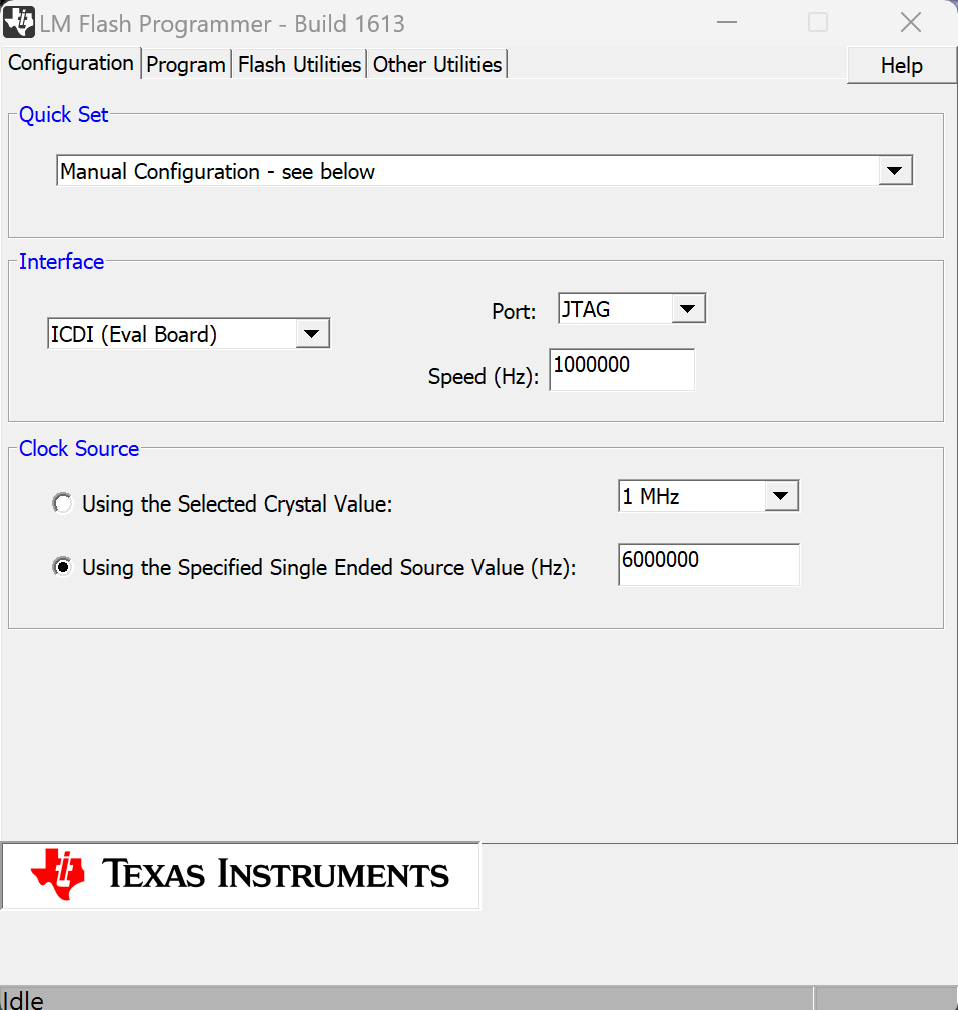
TI LM Flash Programmer 的生產工具

最近遇到60GHz 雷達產品的生產時, 應用到TI的一塊開發版

圖一: 開發版

圖二:LM Flash Programmer configuration

圖三:Flash utility

應用的方式是利用開發版配合LM Flash Programmer將產品的flash 洗掉, 再上產線做重新燒錄FW及測試的動作!

2024年1月4日 星期四

CPU SN software lock

C#開發軟體利用每台PC或是NB的唯一CPU序號特點來做為控管測試軟體的一種軟體鎖.
1. 專案請先加入參考 System.Management
2. 透過 ManagementObjectSearcher 查詢CPU serial number.
private void button2_Click(object sender, EventArgs e)
{
      // 透過 ManagementObjectSearcher 類別用類似 SQL 的語法查詢
      ManagementObjectSearcher wmiSearcher
        = new ManagementObjectSearcher("SELECT * FROM Win32_Processor");
      int i = 0;
       // 使用 ManagementObjectSearcher 的 Get 方法取得所有集合
      foreach (ManagementObject obj in wmiSearcher.Get())
      {
          // 取得CPU 序號
           //Console.WriteLine("CPU{0} ID:\t{1}", i++, obj["ProcessorId"].ToString());
           CommonData.WriteMessage(CommonData.richtextbox, "CPU{0} ID:\t{1}-"+                                         (i++).ToString()+" - ", obj["ProcessorId"].ToString(), Color.Blue, Color.Green);
      }
}
執行畫面


2023年11月15日 星期三

ESP32 IOT smart farm with WIFI mesh

Purpose:
利用ESP32 mesh網絡架構一個智慧農場的控制系統, 包含主控監視端為Node1 includes Xbox joystick, 並利用之前寫過的文章做成各監控端的Node節點並將資料發送到 MQTT 伺服器並透過 Node-red 儀表板顯示其數值., 整合成一個智慧農場的雛型.

Use the ESP32 mesh network to construct a control system for a smart farm, including the main monitoring terminal Node1 with Xbox joystick, and use previously written articles to create other nodes for each monitoring terminal, then send the value to the MQTT server and displayed through the Node-red dashboard. Integrating them into a prototype of a smart farm.

Fundamental:
Previous article :
ESP32 Wifi mesh Control another ESP32 with Relay
ESP32與DS18B20溫度感測器的C#圖形化資料收集
ESP32 WiFi painlessmesh network Application
ESP32 WiFi Mesh 控制 4 port Relay模組
ESP32 WiFi mesh中控介面的實踐
NodeMCU-32S (WiFi Mesh 與 BT BLE應用)

Architecture:


Circuit:
Node_1 Main


Node_2 RelayBoard


Node_3 DHT22


Node_4 Water Sensor


YouTube Demo:

ESP32 Main Node1 code:
#include "painlessMesh.h"
//#include <ArduinoJson.h>
#include <Arduino_JSON.h>
#include <ezButton.h>
//-----Global variable---------------------------------------
#define LED_BUILTIN 2
//--------joystick------------------------------------------
#define VRX_PIN_L  33 // ESP32 pin GPIO33 (ADC0)
#define VRY_PIN_L  32 // ESP32 pin GPIO32 (ADC0)
#define VRX_PIN_R  35 // ESP32 pin GPIO33 (ADC0)
#define VRY_PIN_R  34 // ESP32 pin GPIO32 (ADC0)
#define SW_X       18
#define SW_Y       16
#define SW_A       17
#define SW_B       19

#define LEFT_THRESHOLD_L  2200  
#define RIGHT_THRESHOLD_L 900
#define UP_THRESHOLD_L    2200  
#define DOWN_THRESHOLD_L  900  

#define LEFT_THRESHOLD_R  2200  
#define RIGHT_THRESHOLD_R 900
#define UP_THRESHOLD_R    2200  
#define DOWN_THRESHOLD_R  900  

#define COMMAND_NO_L     0x00
#define COMMAND_LEFT_L   0x01
#define COMMAND_RIGHT_L  0x02
#define COMMAND_UP_L     0x04
#define COMMAND_DOWN_L   0x08

#define COMMAND_NO_R     0x00
#define COMMAND_LEFT_R   0x01
#define COMMAND_RIGHT_R  0x02
#define COMMAND_UP_R     0x04
#define COMMAND_DOWN_R   0x08

int valueX_L = 0 ; // to store the X-axis value
int valueY_L = 0 ; // to store the Y-axis value
int command_L = COMMAND_NO_R;
int valueX_R = 0 ; // to store the X-axis value
int valueY_R = 0 ; // to store the Y-axis value
int command_R = COMMAND_NO_R;
//----------------------------------------------

int bValue_A = 0; // To store value of the button
int bValue_B = 0; // To store value of the button
int bValue_X = 0; // To store value of the button
int bValue_Y = 0; // To store value of the button
ezButton buttonA(SW_A);
ezButton buttonB(SW_B);
ezButton buttonX(SW_X);
ezButton buttonY(SW_Y);
//-----------painlessmesh------------------------------------
#define   MESH_PREFIX     "Peter1015"
#define   MESH_PASSWORD   "No18141814"
#define   MESH_PORT       5555
Scheduler userScheduler;  // to control your personal task
painlessMesh  mesh;

//Number for this node
int nodeNumber = 1;
void sendMessage() ;
String readings;
String getReadings();
Task taskSendMessage( TASK_SECOND * 1 , TASK_FOREVER, &sendMessage );
//--------------------Json data ------------------------------
StaticJsonDocument<200> json_doc;
char json_output[100];
DeserializationError json_error;
const char* payload_node;
const char* payload_function;
const char* payload_data;
//------------------------------------------------------------
//char line[16];
//--------- Flag structure --------------------------------------

#define LINE_BUFFER_LENGTH 1024
typedef struct _vFlag
{
  uint8_t LEDFlag=0;
  uint8_t BTFlag=0;
  uint8_t FunctionFlag=1;
  uint8_t SendFlag=0;
}vFlag;
vFlag *flag_Ptr;
vFlag flag;
//--------- uart structure --------------------------------------
//----------uart--------------
#define LINE_BUFFER_LENGTH 64
typedef struct _vUart
{
  char c;
  int lineIndex = 0;
  int line1Index = 0;
  int BTlineIndex = 0;
  bool lineIsComment;
  bool lineSemiColon;
  char line[128];
  char BTline[20];
  String inputString;
  String BTinputString;
} vUart;
vUart *Uart_Ptr;
vUart Uart;
//-------------------------------------
TaskHandle_t hled;
TaskHandle_t huart;

void vLEDFlashTask(void *pvParameters);
void vUARTTask(void *pvParameters);

void initial()
{
  Serial.println(F("Create Task"));
  //----------------------------------------------------------------------
  // Now set up two tasks to run independently.
  xTaskCreatePinnedToCore(
    vLEDFlashTask, "LEDTask" // A name just for humans
    ,
    1024 // This stack size can be checked & adjusted by reading the Stack Highwater
    ,
    NULL, 2 // Priority, with 3 (configMAX_PRIORITIES - 1) being the highest, and 0 being the lowest.
    ,
    &hled //handle
    ,
    0);

  xTaskCreatePinnedToCore(
    vUARTTask, "UARTTask" // A name just for humans
    ,
    1024 // This stack size can be checked & adjusted by reading the Stack Highwater
    ,
    NULL, 3 // Priority, with 3 (configMAX_PRIORITIES - 1) being the highest, and 0 being the lowest.
    ,
    &huart //handle
    ,
    0);

  //----------------------------------------------------------------------
}
String getReadings()
{
  JSONVar jsonReadings;
 
  //Serial.print(F("meshTask at core:"));
  //Serial.println(xPortGetCoreID());
  jsonReadings["node"] = nodeNumber;
  //jsonReadings["node"] = String(normAccel.XAxis);
  //jsonReadings["node ID"] = String(mesh.getNodeId());
  if(flag.FunctionFlag==1)
  {
    jsonReadings["function"] = "Joystick";
  }
 
  readings = JSON.stringify(jsonReadings);
  return readings;
}
void sendMessage()
{
  //String msg = "Hello from node 1 ";
  String msg = getReadings();
  //msg += mesh.getNodeId();

  if(flag.SendFlag ==1)
  {
    msg=Uart.BTinputString;
    Uart.BTinputString="";
    flag.SendFlag=0;
  }
  mesh.sendBroadcast( msg );
  taskSendMessage.setInterval( random( TASK_SECOND * 1, TASK_SECOND * 2 ));
}

void receivedCallback( uint32_t from, String &msg ) {
  Serial.printf("startHere: Received from %u msg=%s\n", from, msg.c_str());
  flag.LEDFlag=1;
}

void newConnectionCallback(uint32_t nodeId) {
    Serial.printf("--> startHere: New Connection, nodeId = %u\n", nodeId);  
}

void changedConnectionCallback() {
  Serial.printf("Changed connections\n");
  flag.LEDFlag=0;
}

void nodeTimeAdjustedCallback(int32_t offset) {
    Serial.printf("Adjusted time %u. Offset = %d\n", mesh.getNodeTime(),offset);
}

void setup() {
  Serial.begin(9600);
  /**240(default 240 160 80 40 20 and 10Mhz)***/
  setCpuFrequencyMhz(160);
  initial();
  //-----------------------------------------------------------------
  buttonA.setDebounceTime(50); // set debounce time to 50 milliseconds
  buttonB.setDebounceTime(50); // set debounce time to 50 milliseconds
  buttonX.setDebounceTime(50); // set debounce time to 50 milliseconds
  buttonY.setDebounceTime(50); // set debounce time to 50 milliseconds
  //------------------------------------------------
  //-------------------------------------------------------------------
  //mesh.setDebugMsgTypes( ERROR | MESH_STATUS | CONNECTION | SYNC | COMMUNICATION | GENERAL | MSG_TYPES | REMOTE ); // all types on
  mesh.setDebugMsgTypes( ERROR | STARTUP );  // set before init() so that you can see startup messages
  mesh.init( MESH_PREFIX, MESH_PASSWORD, &userScheduler, MESH_PORT );
  mesh.onReceive(&receivedCallback);
  mesh.onNewConnection(&newConnectionCallback);
  mesh.onChangedConnections(&changedConnectionCallback);
  mesh.onNodeTimeAdjusted(&nodeTimeAdjustedCallback);
  userScheduler.addTask( taskSendMessage );
  taskSendMessage.enable();
  //-------------------------------------------
  Serial.println(F("System On!"));
  //-------------------------------------------
}

void loop()
{
  Serial.print(F("Main at core:"));
  Serial.println(xPortGetCoreID());
  while (1)
  {
    buttonA.loop(); // MUST call the loop() function first
    buttonB.loop(); // MUST call the loop() function first
    buttonX.loop(); // MUST call the loop() function first
    buttonY.loop(); // MUST call the loop() function first
    // Read the button value
    bValue_A = buttonA.getState();
    bValue_B = buttonB.getState();
    bValue_X = buttonX.getState();
    bValue_Y = buttonY.getState();

    if (buttonA.isPressed()) {
      Serial.println("The buttonA is pressed");
      Uart.BTinputString="{\"node\":10,\"ButtonA\":\"OFF\"}";
      flag.SendFlag=1;
    }
    if (buttonA.isReleased()) {
      Serial.println("The buttonA is released");
     
    }
    if (buttonB.isPressed()) {
      Serial.println("The buttonB is pressed");
      Uart.BTinputString="{\"node\":10,\"ButtonB\":\"OFF\"}";
      flag.SendFlag=1;
    }
    if (buttonB.isReleased()) {
      Serial.println("The buttonB is released");
      // TODO do something here
    }
    if (buttonX.isPressed()) {
      Serial.println("The buttonX is pressed");
      Uart.BTinputString="{\"node\":10,\"ButtonX\":\"OFF\"}";
      flag.SendFlag=1;
    }
    if (buttonX.isReleased()) {
      Serial.println("The buttonX is released");
      // TODO do something here
    }
    if (buttonY.isPressed()) {
      Serial.println("The buttonY is pressed");
      Uart.BTinputString="{\"node\":10,\"ButtonY\":\"OFF\"}";
      flag.SendFlag=1;
    }
    if (buttonY.isReleased()) {
      Serial.println("The buttonY is released");
      // TODO do something here
    }
    //--------------------------------------------------------
    valueX_L = analogRead(VRX_PIN_L);
    valueY_L = analogRead(VRY_PIN_L);
    valueX_R = analogRead(VRX_PIN_R);
    valueY_R = analogRead(VRY_PIN_R);
    // converts the analog value to commands
    // reset commands
    command_L = COMMAND_NO_L;
    command_R = COMMAND_NO_R;
    // check left/right commands
   
    if (valueX_L > LEFT_THRESHOLD_L)
      command_L = command_L | COMMAND_LEFT_L;
    else if (valueX_L < RIGHT_THRESHOLD_L)
      command_L = command_L | COMMAND_RIGHT_L;
   
    // check up/down commands
    if (valueY_L > UP_THRESHOLD_L)
      command_L = command_L | COMMAND_UP_L;
    else if (valueY_L < DOWN_THRESHOLD_L)
      command_L = command_L | COMMAND_DOWN_L;


    // print command to serial and process command
   
    if (command_L & COMMAND_LEFT_L) {
      Serial.println("COMMAND LEFT_L");
      Uart.BTinputString="{\"node\":10,\"ButtonX\":\"ON\"}";
      flag.SendFlag=1;
    }

    if (command_L & COMMAND_RIGHT_L) {
      Serial.println("COMMAND RIGHT_L");
      Uart.BTinputString="{\"node\":10,\"ButtonB\":\"ON\"}";
      flag.SendFlag=1;
    }

    if (command_L & COMMAND_UP_L) {
      Serial.println("COMMAND UP_L");
      Uart.BTinputString="{\"node\":10,\"ButtonY\":\"ON\"}";
      flag.SendFlag=1;
    }

    if (command_L & COMMAND_DOWN_L) {
      Serial.println("COMMAND DOWN_L");
      Uart.BTinputString="{\"node\":10,\"ButtonA\":\"ON\"}";
      flag.SendFlag=1;
    }
   
    //-----------------------------------------------------
    if (valueX_R > LEFT_THRESHOLD_R)
      command_R = command_R | COMMAND_LEFT_R;
    else if (valueX_R < RIGHT_THRESHOLD_R)
      command_R = command_R | COMMAND_RIGHT_R;
   
    // check up/down commands
    if (valueY_R > UP_THRESHOLD_R)
      command_R = command_R | COMMAND_UP_R;
    else if (valueY_R < DOWN_THRESHOLD_R)
      command_R = command_R | COMMAND_DOWN_R;


    // print command to serial and process command
   
    if (command_R & COMMAND_LEFT_R) {
      Serial.println("COMMAND LEFT_R");
      // TODO: add your task here
    }

    if (command_R & COMMAND_RIGHT_R) {
      Serial.println("COMMAND RIGHT_R");
      // TODO: add your task here
    }

    if (command_R & COMMAND_UP_R) {
      Serial.println("COMMAND UP_R");
      // TODO: add your task here
    }

    if (command_R & COMMAND_DOWN_R) {
      Serial.println("COMMAND DOWN_R");
      // TODO: add your task here
    }
    //-----------------------------------------------------
    //-----------painlessmesh------------------------------
    mesh.update();
  }//----while(1)-------------------------------------------

}
//--------------------------------------------------------
/*--------------------------------------------------*/
void vLEDFlashTask(void *pvParameters) // This is a task.
{
  (void)pvParameters;
 
  Serial.print(F("LEDTask at core:"));
  Serial.println(xPortGetCoreID());
  pinMode(LED_BUILTIN, OUTPUT);
  //oldMillis = millis();
  for (;;) // A Task shall never return or exit.
  {
    if(flag.LEDFlag==1)
    {
      digitalWrite(LED_BUILTIN, HIGH); // turn the LED on (HIGH is the voltage level)
      vTaskDelay(200);
      digitalWrite(LED_BUILTIN, LOW); // turn the LED off by making the voltage LOW
      vTaskDelay(200);
    }
    else{
      vTaskDelay(10);
    }
  }
}

//-------------------------------------------
void vUARTTask(void *pvParameters)
{
  (void)pvParameters;

  Serial.print(F("UARTTask at core:"));
  Serial.println(xPortGetCoreID());
  for (;;)
  {
    while (Serial.available() > 0)
    {
      Uart.c = Serial.read();
 
      if ((Uart.c == '\n') || (Uart.c == '\r'))
      { // End of line reached
        if (Uart.lineIndex > 0)
        { // Line is complete. Then execute!
          Uart.line[Uart.lineIndex] = '\0'; // Terminate string
          //Serial.println( F("Debug") );
          //Serial.println( Uart.inputString );
          processCommand(Uart.line); // do something with the command
          Uart.lineIndex = 0;
          Uart.inputString = "";
        }
        else
        {
          // Empty or comment line. Skip block.
        }
        Uart.lineIsComment = false;
        Uart.lineSemiColon = false;
        Serial.println(F("ok>"));
      }
      else
      {
        //Serial.println( c );
        if ((Uart.lineIsComment) || (Uart.lineSemiColon))
        {
          if (Uart.c == ')')
            Uart.lineIsComment = false; // End of comment. Resume line.
        }
        else
        {
          if (Uart.c == '/')
          { // Block delete not supported. Ignore character.
          }
          else if (Uart.c == '~')
          { // Enable comments flag and ignore all characters until ')' or EOL.
            Uart.lineIsComment = true;
          }
          else if (Uart.c == ';')
          {
            Uart.lineSemiColon = true;
          }
          else if (Uart.lineIndex >= LINE_BUFFER_LENGTH - 1)
          {
            Serial.println("ERROR - lineBuffer overflow");
            Uart.lineIsComment = false;
            Uart.lineSemiColon = false;
          }
          else if (Uart.c >= 'a' && Uart.c <= 'z')
          { // Upcase lowercase
            Uart.line[Uart.lineIndex] = Uart.c - 'a' + 'A';
            Uart.lineIndex = Uart.lineIndex + 1;
            Uart.inputString += (char)(Uart.c - 'a' + 'A');
          }
          else
          {
            Uart.line[Uart.lineIndex] = Uart.c;
            Uart.lineIndex = Uart.lineIndex + 1;
            Uart.inputString += Uart.c;
          }
        }
      }
    } //while (Serial.available() > 0)
    vTaskDelay(10);
  }
}
//------------------------------------------------------------
void processCommand(char *data)
{
  int len, xlen, ylen, zlen, alen;
  char ctemp[20];

  len = Uart.inputString.length();
  if (strstr(data, "VER") != NULL)
  {
    Serial.println(F("W_ATE_Board_20231109"));
  }

}


ESP32 RelayBiard Node2 code:
#include "painlessMesh.h"
#include <Arduino_JSON.h>
//-------------------------------------------------------------
#define   MESH_PREFIX     "Peter1015"
#define   MESH_PASSWORD   "No18141814"
#define   MESH_PORT       5555
//-----Global variable---------------------------------------
#define LED_BUILTIN 2
//-----Relay------------------
#define RELAY1       15
#define RELAY2       13
#define RELAY3       32
#define RELAY4       33
//--------- Flag structure --------------------------------------
typedef struct _vFlag
{
  uint8_t LEDFlag=0;
  uint8_t NodeFlag=0;
  uint8_t FunctionFlag=1;
  uint8_t SendFlag=0;
  uint8_t Relay1=0;
  uint8_t Relay2=0;
  uint8_t Relay3=0;
  uint8_t Relay4=0;
}vFlag;
vFlag *flag_Ptr;
vFlag flag;
typedef struct _vUart
{
  String inputString;
  String BTinputString;
} vUart;
vUart *Uart_Ptr;
vUart Uart;
//---------------------------------------------------
Scheduler userScheduler; // to control your personal task
painlessMesh  mesh;

//Number for this node
int nodeNumber = 2;
// User stub
void sendMessage() ; // Prototype so PlatformIO doesn't complain
String readings;
String getReadings();
Task taskSendMessage( TASK_SECOND * 1 , TASK_FOREVER, &sendMessage );

TaskHandle_t hled;

void vLEDFlashTask(void *pvParameters);

void initial()
{
  Serial.println(F("Create Task"));
  //----------------------------------------------------------------------
  // Now set up two tasks to run independently.
  xTaskCreatePinnedToCore(
    vLEDFlashTask, "LEDTask" // A name just for humans
    ,
    1024 // This stack size can be checked & adjusted by reading the Stack Highwater
    ,
    NULL, 2 // Priority, with 3 (configMAX_PRIORITIES - 1) being the highest, and 0 being the lowest.
    ,
    &hled //handle
    ,
    0);
  //----------------------------------------------------------------------
}
String getReadings()
{
  JSONVar jsonReadings;
 
  //Serial.print(F("meshTask at core:"));
  //Serial.println(xPortGetCoreID());
  jsonReadings["node"] = nodeNumber;
  //jsonReadings["node"] = String(normAccel.XAxis);
  //jsonReadings["node ID"] = String(mesh.getNodeId());
  if(flag.FunctionFlag==1)
  {
    jsonReadings["function"] = "RelayBoard";
  }
  if(flag.Relay1==1)
  {
    jsonReadings["Relay1"] = "ON";
  }
  else
  {  
    jsonReadings["Relay1"] = "OFF";
  }
  if(flag.Relay2==1)
  {
    jsonReadings["Relay2"] = "ON";
  }
  else
  {  
    jsonReadings["Relay2"] = "OFF";
  }
  if(flag.Relay3==1)
  {
    jsonReadings["Relay3"] = "ON";
  }
  else
  {  
    jsonReadings["Relay3"] = "OFF";
  }
  if(flag.Relay4==1)
  {
    jsonReadings["Relay4"] = "ON";
  }
  else
  {  
    jsonReadings["Relay4"] = "OFF";
  }

  readings = JSON.stringify(jsonReadings);
  return readings;
}
void sendMessage() {
  String msg = getReadings();
  //msg += mesh.getNodeId();

  if(flag.SendFlag ==1)
  {
    msg=Uart.BTinputString;
    Uart.BTinputString="";
    flag.SendFlag=0;
  }
  mesh.sendBroadcast( msg );
  taskSendMessage.setInterval( random( TASK_SECOND * 1, TASK_SECOND * 2 ));
}

// Needed for painless library
void receivedCallback( uint32_t from, String &msg )
{
  JSONVar myObject = JSON.parse(msg.c_str());
  if (myObject.hasOwnProperty("node")) {
    //Serial.print("myObject[\"node\"] = ");
    //Serial.println((int) myObject["node"]);
    if((int) myObject["node"]==10)
    {
      flag.NodeFlag=1;
    }
  }
  if (myObject.hasOwnProperty("function")) {
    //Serial.print("myObject[\"function\"] = ");
    //Serial.println((const char*) myObject["function"]);
  }
  if (myObject.hasOwnProperty("ButtonA")) {
   
    if(flag.NodeFlag==1)
    {
      //Serial.print("myObject[\"ButtonA\"] = ");
      //Serial.println((const char*) myObject["ButtonA"]);
      String str=(const char*)myObject["ButtonA"];
      if(str=="ON")
      {
        digitalWrite(RELAY1, LOW);
        flag.Relay1=1;
      }
      if(str=="OFF")
      {
        digitalWrite(RELAY1, HIGH);
        flag.Relay1=0;
      }
    }
  }
  if (myObject.hasOwnProperty("ButtonB")) {
   
    if(flag.NodeFlag==1)
    {
      //Serial.print("myObject[\"ButtonA\"] = ");
      //Serial.println((const char*) myObject["ButtonA"]);
      String str=(const char*)myObject["ButtonB"];
      if(str=="ON")
      {
        digitalWrite(RELAY2, LOW);
        flag.Relay2=1;
      }
      if(str=="OFF")
      {
        digitalWrite(RELAY2, HIGH);
        flag.Relay2=0;
      }
    }
  }
  if (myObject.hasOwnProperty("ButtonY")) {
   
    if(flag.NodeFlag==1)
    {
      //Serial.print("myObject[\"ButtonA\"] = ");
      //Serial.println((const char*) myObject["ButtonA"]);
      String str=(const char*)myObject["ButtonY"];
      if(str=="ON")
      {
        digitalWrite(RELAY3, LOW);
        flag.Relay3=1;
      }
      if(str=="OFF")
      {
        digitalWrite(RELAY3, HIGH);
        flag.Relay3=0;
      }
    }
  }
  if (myObject.hasOwnProperty("ButtonX")) {
   
    if(flag.NodeFlag==1)
    {
      //Serial.print("myObject[\"ButtonA\"] = ");
      //Serial.println((const char*) myObject["ButtonA"]);
      String str=(const char*)myObject["ButtonX"];
      if(str=="ON")
      {
        digitalWrite(RELAY4, LOW);
        flag.Relay4=1;
      }
      if(str=="OFF")
      {
        digitalWrite(RELAY4, HIGH);
        flag.Relay4=0;
      }
    }
  }

  Serial.printf("startHere: Received from %u msg=%s\n", from, msg.c_str());
  flag.LEDFlag=1;
}

void newConnectionCallback(uint32_t nodeId) {
    Serial.printf("--> startHere: New Connection, nodeId = %u\n", nodeId);
   
}

void changedConnectionCallback() {
  Serial.printf("Changed connections\n");
  flag.LEDFlag=0;
}

void nodeTimeAdjustedCallback(int32_t offset) {
    Serial.printf("Adjusted time %u. Offset = %d\n", mesh.getNodeTime(),offset);
}

void setup() {
  Serial.begin(9600);
  setCpuFrequencyMhz(160);
  initial();
  //---------------------------------------------------
  pinMode(RELAY1, OUTPUT);
  digitalWrite(RELAY1, HIGH);
  pinMode(RELAY2, OUTPUT);
  digitalWrite(RELAY2, HIGH);
  pinMode(RELAY3, OUTPUT);
  digitalWrite(RELAY3, HIGH);
  pinMode(RELAY4, OUTPUT);
  digitalWrite(RELAY4, HIGH);
  //---------------------------------------------------
  //mesh.setDebugMsgTypes( ERROR | MESH_STATUS | CONNECTION | SYNC | COMMUNICATION | GENERAL | MSG_TYPES | REMOTE ); // all types on
  mesh.setDebugMsgTypes( ERROR | STARTUP );  // set before init() so that you can see startup messages
  mesh.init( MESH_PREFIX, MESH_PASSWORD, &userScheduler, MESH_PORT );
  mesh.onReceive(&receivedCallback);
  mesh.onNewConnection(&newConnectionCallback);
  mesh.onChangedConnections(&changedConnectionCallback);
  mesh.onNodeTimeAdjusted(&nodeTimeAdjustedCallback);
  userScheduler.addTask( taskSendMessage );
  taskSendMessage.enable();
}

void loop()
{
  Serial.print(F("Main at core:"));
  Serial.println(xPortGetCoreID());
  while (1)
  {
    mesh.update();
  }

}

/*--------------------------------------------------*/
void vLEDFlashTask(void *pvParameters) // This is a task.
{
  (void)pvParameters;
 
  Serial.print(F("LEDTask at core:"));
  Serial.println(xPortGetCoreID());
  pinMode(LED_BUILTIN, OUTPUT);
  //oldMillis = millis();
  for (;;) // A Task shall never return or exit.
  {
    if(flag.LEDFlag==1)
    {
      digitalWrite(LED_BUILTIN, HIGH); // turn the LED on (HIGH is the voltage level)
      vTaskDelay(200);
      digitalWrite(LED_BUILTIN, LOW); // turn the LED off by making the voltage LOW
      vTaskDelay(200);
    }
    else{
      vTaskDelay(10);
    }
  }
}

//-------------------------------------------


ESP32 DHT22 Node3 code:
#include "painlessMesh.h"
#include <Arduino_JSON.h>
#include "DHT.h"
//-------------------------------------------------------------
#define   MESH_PREFIX     "Peter1015"
#define   MESH_PASSWORD   "No18141814"
#define   MESH_PORT       5555
//-----Global variable---------------------------------------
#define LED_BUILTIN 2
//---------------DHT22--------------------
#define DHTPIN 14
#define DHTTYPE DHT22   // DHT 22  (AM2302), AM2321
DHT dht(DHTPIN, DHTTYPE);
float Humidity=0;
float Temperature=0;
//--------- Flag structure --------------------------------------
typedef struct _vFlag
{
  uint8_t LEDFlag=0;
  uint8_t NodeFlag=0;
  uint8_t FunctionFlag=1;
  uint8_t SendFlag=0;
  uint8_t dht22=1;

}vFlag;
vFlag *flag_Ptr;
vFlag flag;
typedef struct _vUart
{
  String inputString;
  String BTinputString;
} vUart;
vUart *Uart_Ptr;
vUart Uart;
//---------------------------------------------------
Scheduler userScheduler; // to control your personal task
painlessMesh  mesh;

//Number for this node
int nodeNumber = 3;
// User stub
void sendMessage() ; // Prototype so PlatformIO doesn't complain
String readings;
String getReadings();
Task taskSendMessage( TASK_SECOND * 1 , TASK_FOREVER, &sendMessage );

TaskHandle_t hled;

void vLEDFlashTask(void *pvParameters);

void initial()
{
  Serial.println(F("Create Task"));
  //----------------------------------------------------------------------
  // Now set up two tasks to run independently.
  xTaskCreatePinnedToCore(
    vLEDFlashTask, "LEDTask" // A name just for humans
    ,
    1024 // This stack size can be checked & adjusted by reading the Stack Highwater
    ,
    NULL, 2 // Priority, with 3 (configMAX_PRIORITIES - 1) being the highest, and 0 being the lowest.
    ,
    &hled //handle
    ,
    0);
  //----------------------------------------------------------------------
}
String getReadings()
{
  JSONVar jsonReadings;
 
  //Serial.print(F("meshTask at core:"));
  //Serial.println(xPortGetCoreID());
  jsonReadings["node"] = nodeNumber;

  if(flag.FunctionFlag==1)
  {
    jsonReadings["function"] = "DHT22";
  }
  jsonReadings["Temperature"] = round(100*Temperature + 0.5)/100;//小數點後兩位
  jsonReadings["Humidity"] = round(100*Humidity + 0.5)/100;//小數點後兩位
 
  readings = JSON.stringify(jsonReadings);
  return readings;
}
void sendMessage() {
  String msg = getReadings();
  //msg += mesh.getNodeId();

  if(flag.SendFlag ==1)
  {
    msg=Uart.BTinputString;
    Uart.BTinputString="";
    flag.SendFlag=0;
  }
  mesh.sendBroadcast( msg );
  taskSendMessage.setInterval( random( TASK_SECOND * 1, TASK_SECOND * 2 ));
}

// Needed for painless library
void receivedCallback( uint32_t from, String &msg )
{
  JSONVar myObject = JSON.parse(msg.c_str());
  if (myObject.hasOwnProperty("node")) {
    //Serial.print("myObject[\"node\"] = ");
    //Serial.println((int) myObject["node"]);
    if((int) myObject["node"]==10)
    {
      flag.NodeFlag=1;
    }
  }
  if (myObject.hasOwnProperty("function")) {
    //Serial.print("myObject[\"function\"] = ");
    //Serial.println((const char*) myObject["function"]);
  }
 
  Serial.printf("startHere: Received from %u msg=%s\n", from, msg.c_str());
  flag.LEDFlag=1;
}

void newConnectionCallback(uint32_t nodeId) {
    Serial.printf("--> startHere: New Connection, nodeId = %u\n", nodeId);
   
}

void changedConnectionCallback() {
  Serial.printf("Changed connections\n");
  flag.LEDFlag=0;
}

void nodeTimeAdjustedCallback(int32_t offset) {
    Serial.printf("Adjusted time %u. Offset = %d\n", mesh.getNodeTime(),offset);
}

void setup() {
  Serial.begin(9600);
  setCpuFrequencyMhz(160);
  initial();
  //---------------------------------------------------
  dht.begin();
  //---------------------------------------------------
  //mesh.setDebugMsgTypes( ERROR | MESH_STATUS | CONNECTION | SYNC | COMMUNICATION | GENERAL | MSG_TYPES | REMOTE ); // all types on
  mesh.setDebugMsgTypes( ERROR | STARTUP );  // set before init() so that you can see startup messages
  mesh.init( MESH_PREFIX, MESH_PASSWORD, &userScheduler, MESH_PORT );
  mesh.onReceive(&receivedCallback);
  mesh.onNewConnection(&newConnectionCallback);
  mesh.onChangedConnections(&changedConnectionCallback);
  mesh.onNodeTimeAdjusted(&nodeTimeAdjustedCallback);
  userScheduler.addTask( taskSendMessage );
  taskSendMessage.enable();
}

void loop()
{
  Serial.print(F("Main at core:"));
  Serial.println(xPortGetCoreID());
  while (1)
  {
    if(flag.dht22==1)
    {    
      float h = dht.readHumidity();
      Humidity = dht.readHumidity();
      // Read temperature as Celsius (the default)
      float t = dht.readTemperature();
      Temperature = dht.readTemperature();
      // Read temperature as Fahrenheit (isFahrenheit = true)
      float f = dht.readTemperature(true);
     
      // Check if any reads failed and exit early (to try again).
      if (isnan(h) || isnan(t) || isnan(f))
      {
        Serial.println("Failed to read from DHT sensor!");
        return;
      }

      // Compute heat index in Fahrenheit (the default)
      float hif = dht.computeHeatIndex(f, h);
      // Compute heat index in Celsius (isFahreheit = false)
      float hic = dht.computeHeatIndex(t, h, false);

      Serial.print("Humidity: ");
      Serial.print(h);
      Serial.print(" % ");
      Serial.print("Temperature: ");
      Serial.print(t);
      Serial.print(" *C ");
      Serial.print(f);
      Serial.print(" *F ");
      Serial.print("Heat index: ");
      Serial.print(hic);
      Serial.print(" *C ");
      Serial.print(hif);
      Serial.println(" *F");
      vTaskDelay(100);
    }
   
    mesh.update();
  }

}

/*--------------------------------------------------*/
void vLEDFlashTask(void *pvParameters) // This is a task.
{
  (void)pvParameters;
 
  Serial.print(F("LEDTask at core:"));
  Serial.println(xPortGetCoreID());
  pinMode(LED_BUILTIN, OUTPUT);
  //oldMillis = millis();
  for (;;) // A Task shall never return or exit.
  {
    if(flag.LEDFlag==1)
    {
      digitalWrite(LED_BUILTIN, HIGH); // turn the LED on (HIGH is the voltage level)
      vTaskDelay(200);
      digitalWrite(LED_BUILTIN, LOW); // turn the LED off by making the voltage LOW
      vTaskDelay(200);
    }
    else{
      vTaskDelay(10);
    }
   
  }
}

//-------------------------------------------

ESP32 Water Sensor Node4 code:
#include <WiFi.h>
//#include <WiFiClient.h>
#include <PubSubClient.h>
#include "painlessMesh.h"
#include <Arduino_JSON.h>
//-------------------------------------------------------------
#define   MESH_PREFIX     "Peter1015"
#define   MESH_PASSWORD   "No18141814"
#define   MESH_PORT       5555
//----------ssid---------------
// ------ 以下修改成你自己的WiFi帳號密碼 ------
char* ssid = "Winson_Y52";
char* password = "8888888888";
//char* ssid = "ras_2.4";
//char* password = "181415181415";
// ------ MQTT setting------
//char* MQTTServer = "broker.mqttgo.io";//https://broker.mqttgo.io/
char* MQTTServer = "test.mosquitto.org";
int MQTTPort = 1883;//MQTT Port
char* MQTTUser = "";//
char* MQTTPassword = "";//
//main level
char* MQTTPubTopic1 = "winsondiy/ESP32/WaterSensor";
char* MQTTPubTopic2 = "winsondiy/ESP32/DHT22";
char* MQTTSubTopic1 = "winsondiy/ESP32/relay1";
long MQTTLastPublishTime;//此變數用來記錄推播時間
long MQTTPublishInterval = 1000;//每5秒推撥一次
WiFiClient WifiClient;
PubSubClient MQTTClient(WifiClient);
// Example MQTT Json message
const char* sensor = "WaterLevel";
const char* exampleMQTT = "{\"sensor\":\"WaterLevel\",\"data\":[20,2]}";
//const char* exampleMQTT = "{\"data\":[20,3]}";
// Calculate needed JSON document bytes with example message
const size_t CAPACITY = JSON_OBJECT_SIZE(sizeof(exampleMQTT) + 20);

//-----Global variable---------------------------------------
#define LED_BUILTIN 2
//-----Water sensor------------------
#define POWER        34
#define SIGNAL       35
int value=0;
int level=0;
int maplevel=0;
//-------DHT22-----------------------------------------
double Humidity=0;
double Temperature=0;
//--------- Flag structure --------------------------------------
typedef struct _vFlag
{
  uint8_t LEDFlag=0;
  uint8_t NodeFlag=0;
  uint8_t FunctionFlag=1;
  uint8_t SendFlag=0;
  uint8_t sensor_Flag=1;
}vFlag;
vFlag *flag_Ptr;
vFlag flag;
typedef struct _vUart
{
  String inputString;
  String BTinputString;
} vUart;
vUart *Uart_Ptr;
vUart Uart;
//---------------------------------------------------
Scheduler userScheduler; // to control your personal task
painlessMesh  mesh;

//Number for this node
int nodeNumber = 4;
// User stub
void sendMessage() ; // Prototype so PlatformIO doesn't complain
String readings;
String getReadings();
Task taskSendMessage( TASK_SECOND * 1 , TASK_FOREVER, &sendMessage );

TaskHandle_t hled;

void vLEDFlashTask(void *pvParameters);

void initial()
{
  Serial.println(F("Create Task"));
  //----------------------------------------------------------------------
  // Now set up two tasks to run independently.
  xTaskCreatePinnedToCore(
    vLEDFlashTask, "LEDTask" // A name just for humans
    ,
    1024 // This stack size can be checked & adjusted by reading the Stack Highwater
    ,
    NULL, 2 // Priority, with 3 (configMAX_PRIORITIES - 1) being the highest, and 0 being the lowest.
    ,
    &hled //handle
    ,
    0);
  //----------------------------------------------------------------------
}
String getReadings()
{
  JSONVar jsonReadings;
 
  //Serial.print(F("meshTask at core:"));
  //Serial.println(xPortGetCoreID());
  jsonReadings["node"] = nodeNumber;
  //jsonReadings["node"] = String(normAccel.XAxis);
  //jsonReadings["node ID"] = String(mesh.getNodeId());
  if(flag.FunctionFlag==1)
  {
    jsonReadings["function"] = "WaterLevel";
  }
  jsonReadings["Level"] = maplevel;
 
  readings = JSON.stringify(jsonReadings);
  return readings;
}
void sendMessage() {
  String msg = getReadings();
  //msg += mesh.getNodeId();

  if(flag.SendFlag ==1)
  {
    msg=Uart.BTinputString;
    Uart.BTinputString="";
    flag.SendFlag=0;
  }
  mesh.sendBroadcast( msg );
  taskSendMessage.setInterval( random( TASK_SECOND * 1, TASK_SECOND * 2 ));
}

// Needed for painless library
void receivedCallback( uint32_t from, String &msg )
{
  JSONVar myObject = JSON.parse(msg.c_str());
  if (myObject.hasOwnProperty("node")) {
    //Serial.print("myObject[\"node\"] = ");
    //Serial.println((int) myObject["node"]);
    if((int) myObject["node"]==3)
    {
      flag.NodeFlag=1;
    }
  }

  if (myObject.hasOwnProperty("function")) {
    //Serial.print("myObject[\"function\"] = ");
    //Serial.println((const char*) myObject["function"]);
  }
  //---------------------------------------
  if(flag.NodeFlag==1)
  {
    if (myObject.hasOwnProperty("Temperature")) {
      //Serial.print("myObject[\"function\"] = ");
      //Serial.println((const char*) myObject["function"]);
      //Temperature=(int) myObject["Temperature"];
      Temperature=myObject["Temperature"];
     
    }
    if (myObject.hasOwnProperty("Humidity")) {
      //Serial.print("myObject[\"function\"] = ");
      //Serial.println((const char*) myObject["function"]);
      //Humidity=(int) myObject["Humidity"];
      Humidity=myObject["Humidity"];
    }
    Serial.print("T:");
    Serial.print(Temperature);
    Serial.print("H:");
    Serial.println(Humidity);


  }


  Serial.printf("startHere: Received from %u msg=%s\n", from, msg.c_str());
  flag.LEDFlag=1;
}

void newConnectionCallback(uint32_t nodeId) {
    Serial.printf("--> startHere: New Connection, nodeId = %u\n", nodeId);
   
}

void changedConnectionCallback() {
  Serial.printf("Changed connections\n");
  flag.LEDFlag=0;
}

void nodeTimeAdjustedCallback(int32_t offset) {
    Serial.printf("Adjusted time %u. Offset = %d\n", mesh.getNodeTime(),offset);
}

void setup() {
  Serial.begin(9600);
  setCpuFrequencyMhz(160);
  initial();
  //---------------------------------------------------
 
  //---------------------------------------------------
  //mesh.setDebugMsgTypes( ERROR | MESH_STATUS | CONNECTION | SYNC | COMMUNICATION | GENERAL | MSG_TYPES | REMOTE ); // all types on
  mesh.setDebugMsgTypes( ERROR | STARTUP );  // set before init() so that you can see startup messages
  mesh.init( MESH_PREFIX, MESH_PASSWORD, &userScheduler, MESH_PORT, WIFI_AP_STA, 6 );
  //-----------------------------------------------------------------
  mesh.onReceive(&receivedCallback);
  //--------------------------
  mesh.stationManual(ssid, password);  
  //mesh.setHostname(HOSTNAME);
  mesh.setRoot(true);
  mesh.setContainsRoot(true);
  //-------------------------
  mesh.onNewConnection(&newConnectionCallback);
  mesh.onChangedConnections(&changedConnectionCallback);
  mesh.onNodeTimeAdjusted(&nodeTimeAdjustedCallback);
  userScheduler.addTask( taskSendMessage );
  taskSendMessage.enable();
}

void loop()
{
  Serial.print(F("Main at core:"));
  Serial.println(xPortGetCoreID());
  while (1)
  {
    if (WiFi.status() != WL_CONNECTED)
    {
      WifiConnect();
    }
   
    if (!MQTTClient.connected())
    {
      MQTTConnect();
    }
    //如果距離上次傳輸已經超過10秒,則Publish溫溼度
    if ((millis() - MQTTLastPublishTime) >= MQTTPublishInterval )
    {
      StaticJsonDocument<CAPACITY> doc, doc1;
      doc["Level"] = maplevel;
      // Serialize JSON doc to char buffer with variable capacity (MQTT client needs char / char*)
      char JSONmessageBuffer[CAPACITY];
      //serializeJson(doc, Serial);
      serializeJson(doc, JSONmessageBuffer);
      MQTTClient.publish(MQTTPubTopic1, JSONmessageBuffer);
      //Serial.println("STATUS: Sent data via MQTT");
      Serial.println("water Data Publish to MQTT Broker");
      doc1["Temperature"] = Temperature;
      doc1["Humidity"] = Humidity;
      char JSONmessageBuffer1[CAPACITY];
      serializeJson(doc1, JSONmessageBuffer1);
      MQTTClient.publish(MQTTPubTopic2, JSONmessageBuffer1);

      doc = NULL;
      doc1 = NULL;
      MQTTLastPublishTime = millis();
    }
    MQTTClient.loop();//update status
    delay(50);
    //---------mesh----------------------
    mesh.update();
  }

}
void WifiConnect()
{
  //WiFi.mode(WIFI_STA);
  WiFi.begin(ssid, password);
  while (WiFi.status() != WL_CONNECTED)
  {
    delay(500);
    Serial.print(".");
  }
  Serial.println("WiFi連線成功");
  Serial.print("IP Address:");
  Serial.println(WiFi.localIP());
}
//-----------------------------------------------
void MQTTConnect()
{
  MQTTClient.setServer(MQTTServer, MQTTPort);
  MQTTClient.setCallback(MQTTCallback);
  while (!MQTTClient.connected())
  {
    //以亂數為ClietID
    String MQTTClientid = "esp32-" + String(random(1000000, 9999999));
    if (MQTTClient.connect(MQTTClientid.c_str(), MQTTUser, MQTTPassword))
    {
      //連結成功,顯示「已連線」。
      Serial.println("MQTT已連線");
      //訂閱SubTopic1主題
      MQTTClient.subscribe(MQTTSubTopic1);
    }
    else
    {
      //若連線不成功,則顯示錯誤訊息,並重新連線
      Serial.print("MQTT連線失敗,狀態碼=");
      Serial.println(MQTTClient.state());
      Serial.println("五秒後重新連線");
      delay(5000);
    }
  }
}
//------------------------------------------
//接收到訂閱時
void MQTTCallback(char* topic, byte* payload, unsigned int length)
{
  Serial.print(topic); Serial.print("訂閱通知:");
  String payloadString;//將接收的payload轉成字串
  //顯示訂閱內容
  for (int i = 0; i < length; i++)
  {
    payloadString = payloadString + (char)payload[i];
  }
  Serial.println(payloadString);
  //比對主題是否為訂閱主題1
  if (strcmp(topic, MQTTSubTopic1) == 0)
  {
    Serial.println("改變燈號:" + payloadString);
    if (payloadString == "ON")
    {
      digitalWrite(16, HIGH);
    }
    if (payloadString == "OFF")
    {
      digitalWrite(16, LOW);
    }
  }
}
/*--------------------------------------------------*/
void vLEDFlashTask(void *pvParameters) // This is a task.
{
  (void)pvParameters;
 
  Serial.print(F("LEDTask at core:"));
  Serial.println(xPortGetCoreID());
  pinMode(LED_BUILTIN, OUTPUT);
  //oldMillis = millis();
  for (;;) // A Task shall never return or exit.
  {
    if(flag.LEDFlag==1)
    {
      digitalWrite(LED_BUILTIN, HIGH); // turn the LED on (HIGH is the voltage level)
      vTaskDelay(200);
      digitalWrite(LED_BUILTIN, LOW); // turn the LED off by making the voltage LOW
      vTaskDelay(200);
    }
    else{
      vTaskDelay(10);
    }
    if(flag.sensor_Flag==1)
    {
      level=waterSensor();
      maplevel=map(level, 0, 1060, 0, 4);
      Serial.print("Water Level:");
      Serial.println(maplevel);
      delay(10);
    }
  }
}
//--------------------------------------------
int waterSensor()
{
  //digitalWrite(POWER,HIGH);
  //delay(10);
  value=analogRead(SIGNAL);
  //delay(10);
  //digitalWrite(POWER,LOW);
  return value;
}
//-------------------------------------------