顯示具有 Bluetooth應用 標籤的文章。 顯示所有文章

2023年11月29日 星期三

Control Your Music by ESP32 Bluetooth Speaker

Purpose:
利用上一篇文章ESP32 Bluetooth Speaker再加上Play, Pause, Next and Previous的按鍵去控制Mobile APP的動作並且可以自動連接上一個連接過的裝置!

Use the ESP32 Bluetooth Speaker in the previous article add the Play, Pause, Next and Previous buttons to control the actions of the Mobile APP and automatically connect to a connected device!

Fundamental:
Reference https://en.wikipedia.org/wiki/List_of_Bluetooth_profiles

藍牙規範(Bluetooth profile),藍牙技術聯盟定義了許多Profile。Profile目的是要確保Bluetooth裝置間的互通性(interoperability)。但Bluetooth產品無須實現所有的Bluetooth規範Profile。Bluetooth 版本 1.1 定義13個Profiles。
目前WinCE6.0提供的Profile有DUN GATEWAY、HF/740T、Audio Gateway、LAP、PAN、HID。

This Project 用到的BT規範(A2DP and AVRCP):
藍牙立體聲音訊傳輸規範(A2DP
藍牙立體聲音訊傳輸規範(Advance Audio Distribution Profile),規定了使用藍牙非同步傳輸信道方式,傳輸高品質音樂檔案數據的協定堆棧軟體和使用方法,基於該協定就能通過以藍牙方式傳輸高品質的立體聲音樂。分為1.1版和1.2版,只要連接雙方支援A2DP協定都能以16 bits,44.1 kHz的品質傳輸聲音訊號。假如有一方沒有支援A2DP的話,只能以8 bits,8 kHz的品質的免手持裝置規範(Handsfree Profile)傳輸模式,聲音品質會大打折扣。
音訊/影片遠端控制設定檔(AVRCP
音訊/影片遠端控制設定檔(Audio Video Remote Control Profile,簡稱AVRCP)設計用於提供控制 TV、Hi-Fi 裝置等的標準[1]介面。此設定檔用於許可單個遠端控制裝置。

Reference the previous article link on blog:


YouTube Demo:


ESP32 Code:

#include "BluetoothA2DPSink.h"
#include <ezButton.h>

BluetoothA2DPSink a2dp_sink;
esp_a2d_connection_state_t last_state;
bool is_active = true;
int LEDFlag = 0;
#define PLAY      33
#define STOP      32
#define NEXT      22
#define PREVIOUS  23
int bValue_A = 0; // To store value of the button
int bValue_B = 0; // To store value of the button
int bValue_X = 0; // To store value of the button
int bValue_Y = 0; // To store value of the button
ezButton buttonA(PLAY);
ezButton buttonB(STOP);
ezButton buttonX(NEXT);
ezButton buttonY(PREVIOUS);

void avrc_metadata_callback(uint8_t id, const uint8_t *text)
{
  Serial.printf("==> AVRC metadata rsp: attribute id 0x%x, %s\n", id, text);
}
//---------------------------------------------------------------------------------
#ifndef LED_BUILTIN
#define LED_BUILTIN 2
#endif
TaskHandle_t hled;
void initial()
{
  Serial.println(F("Create Task"));
  //--------------- create task----------------------------------
  xTaskCreatePinnedToCore(
    vLEDTask, "LEDTask" // A name just for humans
    ,
    1024 // This stack size can be checked & adjusted by reading the Stack Highwater
    ,
    NULL, 2 // Priority, with 3 (configMAX_PRIORITIES - 1) being the highest, and 0 being the lowest.
    ,
    &hled //handle
    ,
    0);
  //----------------------------------------
  //----------------------------------------------------------------------
}

void setup()
{
  Serial.begin(9600);
  Serial.println(F("init"));
  initial();
  //-----------------------------------------------------------------
  buttonA.setDebounceTime(50); // set debounce time to 50 milliseconds
  buttonB.setDebounceTime(50); // set debounce time to 50 milliseconds
  buttonX.setDebounceTime(50); // set debounce time to 50 milliseconds
  buttonY.setDebounceTime(50); // set debounce time to 50 milliseconds
  static const i2s_config_t i2s_config = {
        .mode = (i2s_mode_t) (I2S_MODE_MASTER | I2S_MODE_TX | I2S_MODE_DAC_BUILT_IN),
        .sample_rate = 44100, // corrected by info from bluetooth
        .bits_per_sample = (i2s_bits_per_sample_t) 16, /* the DAC module will only take the 8bits from MSB */
        .channel_format = I2S_CHANNEL_FMT_RIGHT_LEFT,
        .communication_format = (i2s_comm_format_t)I2S_COMM_FORMAT_STAND_MSB,
        .intr_alloc_flags = 0, // default interrupt priority
        .dma_buf_count = 8,
        .dma_buf_len = 64,
        .use_apll = false
    };
  a2dp_sink.set_i2s_config(i2s_config);
  a2dp_sink.set_auto_reconnect(true);
  a2dp_sink.set_avrc_metadata_callback(avrc_metadata_callback);
  a2dp_sink.start("MyMusic");  
}


void loop()
{
  Serial.print(F("Main at core:"));
  Serial.println(xPortGetCoreID());
  while (1)
  {
    buttonA.loop();
    buttonB.loop();
    buttonX.loop();
    buttonY.loop();
    //----------------------------
    bValue_A = buttonA.getState();
    bValue_B = buttonB.getState();
    bValue_X = buttonX.getState();
    bValue_Y = buttonY.getState();
    if (buttonA.isPressed()) {
      Serial.println("The buttonA is pressed");
      Serial.println("play");
      a2dp_sink.play();
      LEDFlag=2;
    }
    if (buttonA.isReleased()) {
      Serial.println("The buttonA is released");
      // TODO do something here
    }
    if (buttonB.isPressed()) {
      Serial.println("The buttonB is pressed");
      Serial.println("pause");
      a2dp_sink.pause();
      LEDFlag=1;
    }
    if (buttonB.isReleased()) {
      Serial.println("The buttonB is released");
      // TODO do something here
    }
    if (buttonX.isPressed()) {
      Serial.println("The buttonX is pressed");
      Serial.println("next");
      a2dp_sink.next();
      LEDFlag=2;
    }
    if (buttonX.isReleased()) {
      Serial.println("The buttonX is released");
      // TODO do something here
    }
    if (buttonY.isPressed()) {
      Serial.println("The buttonY is pressed");
      Serial.println("previous");
      a2dp_sink.previous();
      LEDFlag=2;
    }
    if (buttonY.isReleased()) {
      Serial.println("The buttonY is released");
      // TODO do something here
    }
    //--------------------------------------------------------
    // check state
    esp_a2d_connection_state_t state = a2dp_sink.get_connection_state();
    bool is_connected = state == ESP_A2D_CONNECTION_STATE_CONNECTED;
    if (last_state != state)
    {
      Serial.println(is_connected ? "Connected" : "Not connected");    
      last_state = state;
      if(is_connected)
      {
        LEDFlag=1;
      }
    }
 
    //------------------------------------------
    if (a2dp_sink.get_audio_state()==ESP_A2D_AUDIO_STATE_STARTED)
    {
      //Serial.println("changing state...");
      is_active = !is_active;
   
      if (is_active)
      {
        //Serial.println("play");
        //a2dp_sink.play();
        LEDFlag=2;
      }
      else
      {
        //Serial.println("pause");
        //a2dp_sink.pause();
        //LEDFlag=1;
      }
    }
    delay(10);
  } //---while(1)
 
}

//-------------------------------------------------------------------------
static void vLEDTask(void *pvParameters)
{
  (void)pvParameters;

  Serial.println(F("LEDTask at core:"));
  Serial.println(xPortGetCoreID());
  pinMode(LED_BUILTIN, OUTPUT);
  for (;;) // A Task shall never return or exit.
  {
    if(LEDFlag == 0)
    {
      digitalWrite(LED_BUILTIN, LOW); // turn the LED off by making the voltage LOW
      vTaskDelay(800);
    }
    else if(LEDFlag == 1)
    {
      digitalWrite(LED_BUILTIN, HIGH); // turn the LED on (HIGH is the voltage level)
      vTaskDelay(800);
      digitalWrite(LED_BUILTIN, LOW); // turn the LED off by making the voltage LOW
      vTaskDelay(800);
    }
    else if(LEDFlag == 2)
    {
      digitalWrite(LED_BUILTIN, HIGH); // turn the LED on (HIGH is the voltage level)
      vTaskDelay(300);
      digitalWrite(LED_BUILTIN, LOW); // turn the LED off by making the voltage LOW
      vTaskDelay(300);
    }
    else
    {
      vTaskDelay(10);
    }
  }
}

2023年11月25日 星期六

ESP32 Bluetooth Speaker

Purpose:
Use ESP32 A2DP Sink (Music Receiver) to build your own Bluetooth Speaker.
This creates a new Bluetooth device with the name “MyMusic” and the output will be sent to the output directly to the internal DAC of the ESP32.
The output goes now to the DAC pins GPIO25 (Channel 1) and GPIO26 (Channel 2).
Architectures:
BOM(Bill of Material):
Single Speaker

Single Speaker

ESP32

Amplifier

Fundamental:

Features of the ESP32 include the following:
Processors:
CPU: Xtensa dual-core (or single-core) 32-bit LX6 microprocessor, operating at 160 or 240 MHz and performing at up to 600 DMIPS
Ultra low power (ULP) co-processor
Memory: 520 KiB RAM, 448 KiB ROM
Wireless connectivity:
Wi-Fi: 802.11 b/g/n
Bluetooth: v4.2 BR/EDR and BLE (shares the radio with Wi-Fi)
Peripheral interfaces:
34 × programmable GPIOs
4 × SPI
2 × I²S interfaces
2 × I²C interfaces
3 × UART

I2S is an electrical serial bus interface standard used for connecting digital audio devices together. It is used to communicate PCM audio data between integrated circuits in an electronic device.

ESP32 A2DP Library
Reference https://github.com/pschatzmann/ESP32-A2DP

XHM189 2 x 50W TPA3116D2 2-Channel High-end Digital Amplifier Board 24V Stereo
YouTube Demo:

ESP32 Code:
#include "BluetoothA2DPSink.h"

BluetoothA2DPSink a2dp_sink;

//----------------------------------------------------------------
//---------------------------------------------------------------------------------
#ifndef LED_BUILTIN
#define LED_BUILTIN 2
#endif
TaskHandle_t hled;
void initial()
{
  Serial.println(F("Create Task"));
  //--------------- create task----------------------------------
  xTaskCreatePinnedToCore(
    vLEDTask, "LEDTask" // A name just for humans
    ,
    1024 // This stack size can be checked & adjusted by reading the Stack Highwater
    ,
    NULL, 2 // Priority, with 3 (configMAX_PRIORITIES - 1) being the highest, and 0 being the lowest.
    ,
    &hled //handle
    ,
    0);
  //----------------------------------------
  //----------------------------------------------------------------------
  //vTaskSuspend(hfunction); //暫停TASK運行
  //----------------------------------------------------------------------
}

void setup()
{
  Serial.begin(9600);
  Serial.println(F("init"));
  initial();
  static const i2s_config_t i2s_config = {
        .mode = (i2s_mode_t) (I2S_MODE_MASTER | I2S_MODE_TX | I2S_MODE_DAC_BUILT_IN),
        .sample_rate = 44100, // corrected by info from bluetooth
        .bits_per_sample = (i2s_bits_per_sample_t) 16, /* the DAC module will only take the 8bits from MSB */
        .channel_format = I2S_CHANNEL_FMT_RIGHT_LEFT,
        .communication_format = (i2s_comm_format_t)I2S_COMM_FORMAT_STAND_MSB,
        .intr_alloc_flags = 0, // default interrupt priority
        .dma_buf_count = 8,
        .dma_buf_len = 64,
        .use_apll = false
    };

  a2dp_sink.set_i2s_config(i2s_config);
  a2dp_sink.start("MyMusic");  

}


void loop() {
  Serial.print(F("Main at core:"));
  Serial.println(xPortGetCoreID());
  while(1)
  {
    vTaskDelay(5);
  }
}

//-------------------------------------------------------------------------
static void vLEDTask(void *pvParameters)
{
  (void)pvParameters;

  Serial.println(F("LEDTask at core:"));
  Serial.println(xPortGetCoreID());
  pinMode(LED_BUILTIN, OUTPUT);
  for (;;) // A Task shall never return or exit.
  {
    digitalWrite(LED_BUILTIN, HIGH); // turn the LED on (HIGH is the voltage level)
    vTaskDelay(200);
    digitalWrite(LED_BUILTIN, LOW); // turn the LED off by making the voltage LOW
    vTaskDelay(200);
  }
}

2023年8月6日 星期日

ESP32 Obstacle Avoiding Robot Car

Purpose:

Refer to the previous two articles (ESP32 Bluetooth Remote Control Car -DIY) and (ESP32 with HC-SR04 Ultrasonic Sensor)

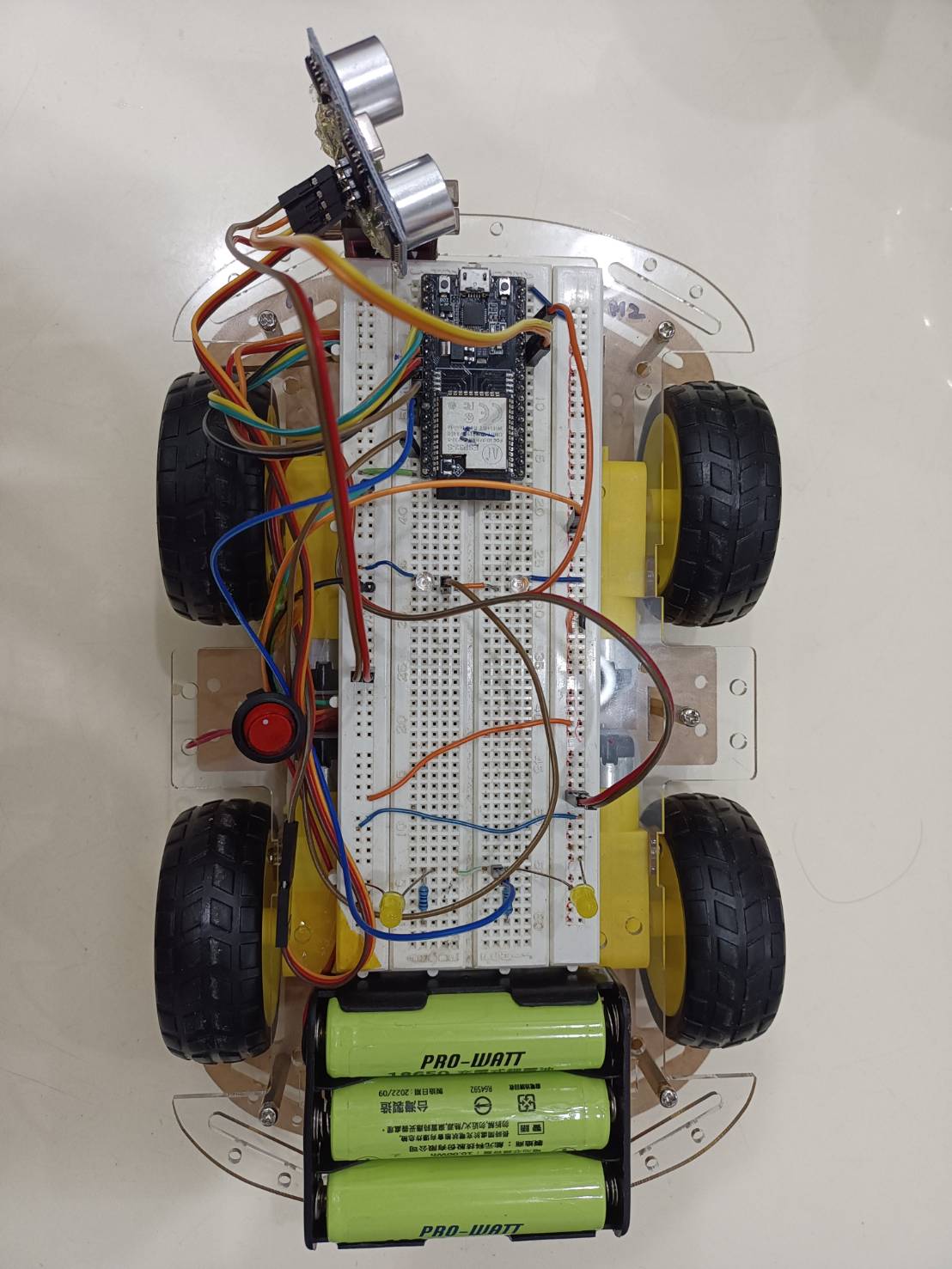
You can build your own ESP32 based obstacle avoiding robot car. The car uses a servo mounted ultrasonic sensor to detect objects in front of and on either side of the car and an L298N DC motor driver shield to drive four geared motors, one on each wheel.

Download Library
robojax_L298N-DC-Motor_library
https://robojax.com/learn/arduino/robojax_L298N-DC-Motor_library.zip

Circuit:


YouTubeDemo:

CodeIntroduce:

#include <Robojax_L298N_DC_motor.h>
#include <BluetoothSerial.h>
#include <ESP32Servo.h>
//--------- Flag structure --------------------------------------
typedef struct _vFlag
{
  uint8_t BTFlag = 0;
  uint8_t L298NFlag = 0;
  uint8_t HCSR04Flag = 1;
  uint8_t LEDFlag = 1;
  uint8_t ServoFlag = 0;
  uint8_t initial_Flag = 0;
  uint8_t FunctionFlag = 0;
  uint8_t back_light_Flag = 0;
  uint8_t front_light_Flag = 0;
} vFlag;
vFlag *flag_Ptr;
vFlag flag;
//---------BT--------------------
BluetoothSerial SerialBT;
//---------------servo------------------------------
Servo myservo;  // create servo object to control a servo
// Recommended PWM GPIO pins on the ESP32 include 2,4,12-19,21-23,25-27,32-33
#define servoPin 13
//------LED------------------
#define LED_BUILTIN 2
//-------------L298---------------------------------------------------
// motor 1 settings
#define CHA 0
#define ENA 4 // this pin must be PWM enabled pin if Arduino board is used
#define IN1 16
#define IN2 17
// motor 2 settings
#define IN3 18
#define IN4 19
#define ENB 5// this pin must be PWM enabled pin if Arduino board is used
#define CHB 1

const int CCW = 2; // do not change
const int CW  = 1; // do not change

#define motor1 1 // do not change
#define motor2 2 // do not change

// for two motors without debug information // Watch video instruciton for this line: https://youtu.be/2JTMqURJTwg
Robojax_L298N_DC_motor motors(IN1, IN2, ENA, CHA,  IN3, IN4, ENB, CHB);
//------Bluetooth RC Controller Define ----
#define back_light 21
#define front_light 22
//-----hcsr04 sensor------------------
#define TRIGPIN_PIN 12
#define ECHO_PIN 14
long duration;
unsigned long currentMillis = 0;
//----------global ------------------------
#define MAX_DISTANCE 200
#define MAX_SPEED 190 // Sets speed of DC motors
int speedSet = 0;
int distance = 60;
int distanceR = 0;
int distanceL = 0;
//--------- uart structure --------------------------------------
//----------uart--------------
#define LINE_BUFFER_LENGTH 64
typedef struct _vUart
{
  char c;
  int lineIndex = 0;
  int line1Index = 0;
  int BTlineIndex = 0;
  bool lineIsComment;
  bool lineSemiColon;
  //char *line;
  char line[128];
  //char line1[128];
  char BTline[20];
  //char R_line[20];
  //char L_line[20];
  String inputString;
  String BTinputString;
  String S1inputString;
  int V[16];
  char ctemp[30];
  char I2C_Data[80];
  int DC_Spped = 50;
  float Voltage[16];
  int Buffer[128];
  int StartCnt = 0;
  int ReadCnt = 0;
  int sensorValue = 0;
} vUart;
vUart *Uart_Ptr;
vUart Uart;
//-------------------------------------
TaskHandle_t huart;
TaskHandle_t hfunction;

void vUARTTask(void *pvParameters);
void vFunctionTask(void *pvParameters);
//------------------------------------------------------------------------------
void initial()
{
  Serial.println(F("Create Task"));
  //----------------------------------------------------------------------
  xTaskCreatePinnedToCore(
    vUARTTask, "UARTTask" // A name just for humans
    ,
    1024 // This stack size can be checked & adjusted by reading the Stack Highwater
    ,
    NULL, 3 // Priority, with 3 (configMAX_PRIORITIES - 1) being the highest, and 0 being the lowest.
    ,
    &huart //handle
    ,
    0);

  xTaskCreatePinnedToCore(
    vFunctionTask, "FunctionTask"
    ,
    1024 // Stack size
    ,
    NULL, 1 // Priority
    ,
    &hfunction
    ,
    1);

  //----------------------------------------------------------------------

  //----------------------------------------------------------------------
}

void Forward()
{  
  //motors.rotate(motor1, 60, CCW);
  //motors.rotate(motor2, 60, CCW);
  digitalWrite(IN1, LOW);
  digitalWrite(IN2, HIGH);
  analogWrite(ENA, 100);
  digitalWrite(IN3, LOW);
  digitalWrite(IN4, HIGH);
  analogWrite(ENB, 100);
}

void Reverse(){
  //motors.rotate(motor2, 70, CW);
  //motors.rotate(motor1, 70, CW);
  digitalWrite(IN1, HIGH);
  digitalWrite(IN2, LOW);
  analogWrite(ENA, 100);
  digitalWrite(IN3, HIGH);
  digitalWrite(IN4, LOW);
  analogWrite(ENB, 100);
}
void Left()
{
  //motors.rotate(motor1, 70, CW);
  //motors.rotate(motor2, 70, CCW); //LF
  digitalWrite(IN1, LOW);
  digitalWrite(IN2, HIGH);
  analogWrite(ENA, 100);
}
void Right()
{
  digitalWrite(IN3, LOW);
  digitalWrite(IN4, HIGH);
  analogWrite(ENB, 100);
  //motors.rotate(motor1, 70, CCW); //RF
  //motors.rotate(motor2, 70, CW);
}
void Stop()
{
  motors.brake(1);
  motors.brake(2);
  //myservo.detach();
}
//-------------------------------------------------
void setup()
{
  Serial.begin(9600);
  Serial.println(F("init"));
  initial();
  SerialBT.begin("BT_L298N");
  myservo.setPeriodHertz(50);    
  myservo.attach(servoPin, 500, 2400);
  pinMode(LED_BUILTIN, OUTPUT);
  pinMode(TRIGPIN_PIN, OUTPUT);
  pinMode(ECHO_PIN, INPUT);
  pinMode(IN1, OUTPUT);
  pinMode(IN2, OUTPUT);
  pinMode(IN3, OUTPUT);
  pinMode(IN4, OUTPUT);
  pinMode(ENA, OUTPUT);
  pinMode(ENB, OUTPUT);
  pinMode(back_light, OUTPUT);
  pinMode(front_light, OUTPUT);
  motors.begin();
  myservo.write(90);
}
//-----------------------------------------
void loop()
{
  Serial.print(F("Main at core:"));
  Serial.println(xPortGetCoreID());
  while(1)
  {
    if(flag.HCSR04Flag==1)
    {
      if(distance<=35)
      {
        Stop();
        delay(200);
        Reverse();
        delay(400);
        Stop();
        delay(100);
        flag.HCSR04Flag=2;
        delay(2000);
        flag.HCSR04Flag=3;
        delay(2000);
        flag.HCSR04Flag=1;
        if ((distanceR >= distanceL) )
        {
          Left();
          delay(700);
          Stop();
          delay(200);
          flag.HCSR04Flag=1;
        }
        else
        {
          Right();
          delay(700);
          Stop();
          delay(200);
          flag.HCSR04Flag=1;
        }
        myservo.write(90);
        delay(1000);
      }
      else
      {
        flag.HCSR04Flag=1;
        Forward();
        delay(100);
        Stop();
        delay(30);
      }      
    }
    vTaskDelay(1);
  }
}
//----------------------------------------
void processCommand(char *data)
{
  int len, xlen, ylen, zlen, alen;
  int tempDIO;
  String stemp;

  len = Uart.inputString.length();
  //---------------------------------------
  if (strstr(data, "VER") != NULL)
  {
    Serial.println(F("ESP32_20230710"));
  }
  //-------------- HCSR04 --------------------
  if (strstr(data, "HCSR04_ON") != NULL)
  {
    flag.HCSR04Flag = 1;
    Serial.println(F("HCSR04_ON"));
  }
  if (strstr(data, "HCSR04_OFF") != NULL)
  {
    flag.HCSR04Flag = 0;
    Serial.println(F("HCSR04_OFF"));
  }  
  //----------------L298N-----------
  if (strstr(data, "F") != NULL)
  {
    Serial.println(F("Forward"));
    Forward();
    //forward();
   
  }
  if (strstr(data, "L") != NULL)
  {
    Serial.println(F("Left"));
    Left();
  }
  if (strstr(data, "R") != NULL)
  {
    Serial.println(F("Right"));
    Right();
  }
  if (strstr(data, "B") != NULL)
  {
    Serial.println(F("Reverse"));
    Reverse();
    //backward();
  }
  if (strstr(data, "S") != NULL)
  {
    Serial.println(F("Stop"));
    Stop();
  }
  //-----------------servo----------
  //-------------- Servo --------------------
  if (strstr(data, "SERVO_5")!= NULL)
  {
    Serial.println(F("SERVO_5"));
    myservo.write(5);
    //myservo.detach();
  }
  if (strstr(data, "SERVO_10")!= NULL)
  {
    Serial.println(F("SERVO_10"));
    myservo.write(10);
  }
  if (strstr(data, "SERVO_20")!= NULL)
  {
    Serial.println(F("SERVO_20"));
    myservo.write(20);
  }
  if (strstr(data, "SERVO_30")!= NULL)
  {
    Serial.println(F("SERVO_30"));
    myservo.write(30);
  }
  if (strstr(data, "SERVO_50")!= NULL)
  {
    Serial.println(F("SERVO_50"));
    myservo.write(50);
  }
  if (strstr(data, "SERVO_80")!= NULL)
  {
    Serial.println(F("SERVO_80"));
    myservo.write(80);
  }
  if (strstr(data, "SERVO_90")!= NULL)
  {
    Serial.println(F("SERVO_90"));
    myservo.write(90);
  }
  if (strstr(data, "SERVO_100")!= NULL)
  {
    Serial.println(F("SERVO_100"));
    myservo.write(100);
  }
  if (strstr(data, "SERVO_120")!= NULL)
  {
    Serial.println(F("SERVO_120"));
    myservo.write(120);
  }
  if (strstr(data, "SERVO_140")!= NULL)
  {
    Serial.println(F("SERVO_140"));
    myservo.write(140);
  }
  if (strstr(data, "SERVO_150")!= NULL)
  {
    Serial.println(F("SERVO_150"));
    myservo.write(150);
  }
}
//-----------------------------------------
//-------------------BT-----------------
void BTprocessCommand(String data)
{
  if (data =="FS")
  {
    Serial.println(F("Forward"));
    Forward();
  }
  if (data == "LS")
  {
    Serial.println(F("Left"));
    Left();
  }
  if (data == "RS")
  {
    Serial.println(F("Right"));
    Right();
  }
  if (data == "BS")
  {
    Serial.println(F("Reverse"));
    Reverse();
  }
  if (data == "S")
  {
    Serial.println(F("Stop"));
    Stop();
  }
  if (data == "X")
  {
    flag.HCSR04Flag=0;
    Serial.println(F("Stop"));
    Stop();
    flag.back_light_Flag=2;
    flag.HCSR04Flag=0;
  }
  if (data == "x")
  {
    Serial.println(F("Stop"));
    Stop();
    flag.back_light_Flag=0;
    flag.HCSR04Flag=1;
  }
  if (data == "FGFS")
  {
    //LF
    motors.rotate(motor1, 60, CCW);
    motors.rotate(motor2, 100, CCW);
  }
  if (data == "FIFS")
  {
    //RF
    motors.rotate(motor1, 100, CCW);
    motors.rotate(motor2, 60, CCW);
  }
  if (data == "BHBS")
  {
    //LB
    motors.rotate(motor1, 60, CW);
    motors.rotate(motor2, 100, CW);
  }
  if (data == "BJBS")
  {
    //RB
    motors.rotate(motor1, 100, CW);
    motors.rotate(motor2, 60, CW);
  }
  if (data == "U")
  {
    //backlight
    digitalWrite(back_light, HIGH);  
    flag.back_light_Flag=1;
    //Serial.println(F("light"));
  }
  if (data == "u")
  {
    //backlight
    digitalWrite(back_light, LOW);
    flag.back_light_Flag=0;
    //Serial.println(F("lightoff"));
  }
  if (data == "W")
  {
    digitalWrite(front_light, HIGH);  
    flag.front_light_Flag=1;
    //Serial.println(F("light"));
  }
  if (data == "w")
  {
    digitalWrite(front_light, LOW);
    flag.front_light_Flag=0;
    //Serial.println(F("lightoff"));
  }
}
//-------------------------------------------
void vUARTTask(void *pvParameters)
{
  (void)pvParameters;

  Serial.print(F("UARTTask at core:"));
  Serial.println(xPortGetCoreID());
  for (;;)
  {
    while (Serial.available() > 0)
    {
      Uart.c = Serial.read();
 
      if ((Uart.c == '\n') || (Uart.c == '\r'))
      { // End of line reached
        if (Uart.lineIndex > 0)
        { // Line is complete. Then execute!
          Uart.line[Uart.lineIndex] = '\0'; // Terminate string
          //Serial.println( F("Debug") );
          //Serial.println( Uart.inputString );
          processCommand(Uart.line);
          Uart.lineIndex = 0;
          Uart.inputString = "";
        }
        else
        {
          // Empty or comment line. Skip block.
        }
        Uart.lineIsComment = false;
        Uart.lineSemiColon = false;
        Serial.println(F("ok>"));
      }
      else
      {
        //Serial.println( c );
        if ((Uart.lineIsComment) || (Uart.lineSemiColon))
        {
          if (Uart.c == ')')
            Uart.lineIsComment = false; // End of comment. Resume line.
        }
        else
        {
          if (Uart.c == '/')
          { // Block delete not supported. Ignore character.
          }
          else if (Uart.c == '~')
          { // Enable comments flag and ignore all characters until ')' or EOL.
            Uart.lineIsComment = true;
          }
          else if (Uart.c == ';')
          {
            Uart.lineSemiColon = true;
          }
          else if (Uart.lineIndex >= LINE_BUFFER_LENGTH - 1)
          {
            Serial.println("ERROR - lineBuffer overflow");
            Uart.lineIsComment = false;
            Uart.lineSemiColon = false;
          }
          else if (Uart.c >= 'a' && Uart.c <= 'z')
          { // Upcase lowercase
            Uart.line[Uart.lineIndex] = Uart.c - 'a' + 'A';
            Uart.lineIndex = Uart.lineIndex + 1;
            Uart.inputString += (char)(Uart.c - 'a' + 'A');
          }
          else
          {
            Uart.line[Uart.lineIndex] = Uart.c;
            Uart.lineIndex = Uart.lineIndex + 1;
            Uart.inputString += Uart.c;
          }
        }
      }
    } //while (Serial.available() > 0)
    while (SerialBT.available())
    {
      flag.L298NFlag=1;
      String BTdata = SerialBT.readString();
      Stop();
      Serial.println(BTdata);
      BTprocessCommand(BTdata); // do something with the command
    }//while (BT.available())
    vTaskDelay(1);
  }
}
void vFunctionTask(void *pvParameters)
{
  (void)pvParameters;

  Serial.print(F("FunctionTask at core:"));
  Serial.println(xPortGetCoreID());
  for (;;) // A Task shall never return or exit.
  {
    if(flag.HCSR04Flag==1)
    {
      currentMillis = millis();
      myservo.write(90);
      digitalWrite(TRIGPIN_PIN, LOW);  
      delayMicroseconds(2);  
      digitalWrite(TRIGPIN_PIN, HIGH);
      delayMicroseconds(10);
      digitalWrite(TRIGPIN_PIN, LOW);  
      duration= pulseIn(ECHO_PIN, HIGH);
      distance= duration/29/2;
      if (duration==0)
      {
        Serial.println("No pulse is from sensor");
      }
      else
      {
        Serial.print("Ultrasonic sensor is shown distance:");
        Serial.print(distance);
        Serial.println("cm");
        Serial.print(distanceR-distanceL);
        Serial.println("cm");
      }
    }
    if(flag.HCSR04Flag==2)  //lookRight
    {
      myservo.write(20);
      digitalWrite(TRIGPIN_PIN, LOW);  
      delayMicroseconds(2);  
      digitalWrite(TRIGPIN_PIN, HIGH);
      delayMicroseconds(10);  
      digitalWrite(TRIGPIN_PIN, LOW);  
      duration= pulseIn(ECHO_PIN, HIGH);
      distanceR= duration/29/2;
      if (duration==0)
      {
        Serial.println("No pulse is from sensor");
      }
      else
      {
        //Serial.print("Ultrasonic sensor is shown distanceR:");
        //Serial.print(distanceR);
        //Serial.println("cm");
      }
    }
    if(flag.HCSR04Flag==3)  //lookLeft
    {
      myservo.write(160);
      digitalWrite(TRIGPIN_PIN, LOW);  
      delayMicroseconds(2);  
      digitalWrite(TRIGPIN_PIN, HIGH);
      delayMicroseconds(10);  
      digitalWrite(TRIGPIN_PIN, LOW);  
      duration= pulseIn(ECHO_PIN, HIGH);
      distanceL= duration/29/2;
      if (duration==0)
      {
        Serial.println("No pulse is from sensor");
      }
      else
      {
        //Serial.print("Ultrasonic sensor is shown distanceL:");
        //Serial.print(distanceL);
        //Serial.println("cm");
      }
    }
    vTaskDelay(1);
  }
}